FLUX 3 Video
Text, image or extend, with sound, up to 4K.
5–20 secondsSingle generation
720p to 4KResolution
24 fpsFrame rate
Text, still image or videoWays to start
5–15 new secondsExtend
Generated with the videoSound
Sound generated with the picture
FLUX 3 Video makes the sound with the frames: ambience, sound effects, and spoken lines with lip sync. Put dialogue in quotes in the prompt, or switch sound off for a silent clip; the price is the same either way.
- •Ambience for the setting
- •Effects tied to what happens on screen
- •Quoted lines spoken with lip sync
- •Silent clips on request
Up to 4K and 20 seconds
Choose 720p, 1080p, 1440p or 4K and any whole number of seconds from 5 to 20, at 24 fps. Text in the scene, such as signs and titles, comes out legible.
- •720p, 1080p, 1440p or 4K
- •5 to 20 seconds in one generation
- •24 fps
- •Legible signs and titles
First and last frame
Start from one still, or give a first and a last frame and FLUX 3 Video makes the movement between them. The image sets the shape of the clip.
- •Upload a first frame
- •Add a last frame to end on
- •The motion in between is generated
- •The picture sets the shape
Extend any clip
Upload a video, describe what happens next, and get 5 to 15 more seconds from its last frames, joined to your clip in one file. Only the new seconds are billed.
- •Your own footage or a generated clip
- •5 to 15 new seconds at a time
- •Original and continuation in one video
- •The source clip is free
Professional video for every use case
Bring a still image to life.
Start on your picture and describe what moves: here a cat walks into a photo of an empty window seat.Extend a clip you already have.
Add 5 to 15 seconds after its last frame. You get one video back: your clip, then the new seconds.Short scenes with spoken lines.
Write the line in quotes and the character says it, lips in sync, with the scene's sound around it.Multi-shot sequences.
Describe several shots with hard cuts; one generation cuts between them under one soundtrack.How it works

1
Choose the tool
Open the Video Workshop, pick Text to Video, Image to Video or Extend Video, and select FLUX 3 Video. Add a first frame, or the clip to extend, when the tool asks for one.
2
Describe the scene and the sound
Write what happens, how the camera moves and what should be heard. For dialogue, put the spoken line in quotes.

3
Pick the resolution and length
Choose 720p to 4K and 5 to 20 seconds (5 to 15 when extending), then generate. The clip is ready in a few minutes.
Prompts to try
A rainy night street. Above a tiny ramen bar, a hand-painted neon sign flickers on and spells OPEN LATE in warm orange letters. Behind the fogged window a cook ladles steaming broth into bowls. Slow push-in toward the sign, rain hissing on the pavement.
Text in the scene, from a prompt alone.
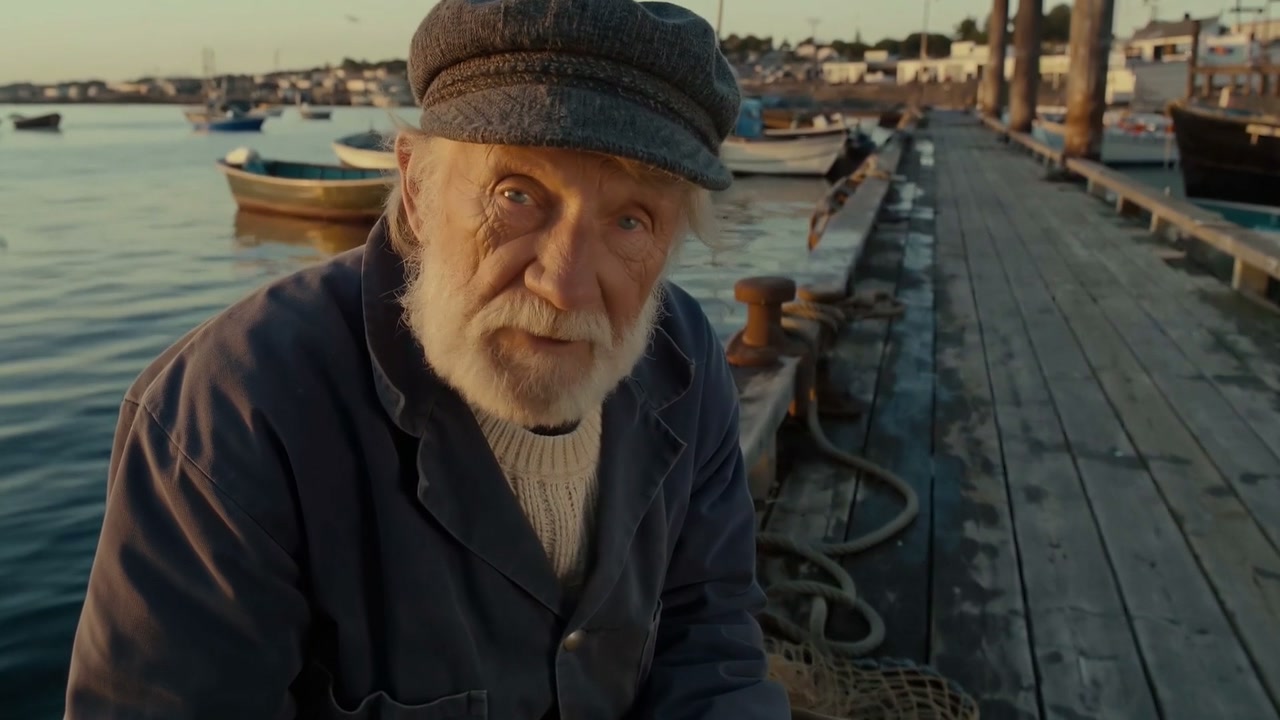
Close-up of an old fisherman with a white beard and a knitted cap, sitting on a wooden dock at golden hour, mending a net. He looks up into the camera and says, calmly: "The sea gives what it wants." Gulls cry overhead, waves knock against the dock.
A line in quotes is spoken, lips in sync.
Wide aerial shot of an empty desert highway at sunset as a red vintage convertible speeds toward the horizon. Hard cut: close-up of the driver hands on the steering wheel, sunlight flaring. Hard cut: low shot of the car disappearing over a hill in a cloud of dust.
Several shots with hard cuts in one generation.
Pricing for FLUX 3 Video
Runs on credits — no per-model surcharges, no surprise billing.
200credits
per second of video
≈ 1000 credits for a 5-second clip
Show pricing details▾
ResolutionCredits
- 720pdefault200/ sec
- 1080p325/ sec
- 1440p380/ sec
- 4k555/ sec
Credits work across every plan. See /pricing for credit packages.
Use FLUX 3 Video via the API
FLUX 3 Video is available through the BudgetPixel developer API — the same model the studio runs, supporting text-to-video, image-to-video, and video extension. Pricing is metered in credits (200 credits/second at 720p, 325 credits/second at 1080p, 380 credits/second at 1440p, 555 credits/second at 4k in the default Generate mode; Extend mode 285, 365, 420 and 610), charged only on success, with an API key available on Premium plans and above.
curl -X POST https://api.budgetpixel.com/v1/videos/flux-3-video \
  -H "Authorization: Bearer $BUDGETPIXEL_API_KEY" \
  -H "Content-Type: application/json" \
-d '{"prompt": "your prompt here"}'No code? Use FLUX 3 Video from Claude or Cursor
FLUX 3 Video is also available through the BudgetPixel MCP server. Connect your account to Claude, Cursor, or any MCP-enabled agent and generate with FLUX 3 Video by asking in plain language — same credits, same pricing, no code required.
FLUX 3 Video at a glance
- Text-to-video
- First and last frame
- Extend a video
- Generated audio
- 720p to 4K
- 5-20 seconds
- Text in the scene
- Multi-shot prompts
How FLUX 3 Video compares
The differences that actually change which one you pick.
- FLUX 3 Video vs Kling 3.0 4K
- Both render 4K. FLUX 3 Video runs up to 20 seconds in one generation and can extend a clip; Kling 3.0 4K costs less per 4K second (450 credits against 555).
- FLUX 3 Video vs SeeDance 2.5
- At 1080p FLUX 3 Video costs 325 credits a second against SeeDance 2.5's 750, and it adds 1440p and 4K. SeeDance 2.5 takes reference images, videos and audio, which FLUX 3 Video does not.
- FLUX 3 Video vs MiniMax H3 Max
- Both can extend a video. MiniMax H3 Max extends at up to 2K and takes reference media; FLUX 3 Video extends at up to 4K and makes up to 20 seconds in one generation.
Frequently asked questions
What is FLUX 3 Video?▾
FLUX 3 Video is Black Forest Labs' video model. It makes clips from a text prompt, animates a still image from its first frame (or moves from a first to a last frame), and continues a video you already have, with sound generated alongside the picture, up to 4K and 20 seconds.
How do I use FLUX 3 Video on BudgetPixel?▾
Select FLUX 3 Video in the Text to Video, Image to Video or Extend Video tool of the Video Workshop, describe the scene, the camera and the sound, then choose a resolution and a length. It is also available through the BudgetPixel developer API and MCP connector.
What inputs does FLUX 3 Video accept?▾
A text prompt is always required. Image to Video takes a first frame, with an optional last frame to end on. Extend Video takes an MP4 or MOV clip and continues it from its final frames; it does not change the footage you already have. There are no reference images and no audio input.
Does FLUX 3 Video generate sound and dialogue?▾
Yes. It generates ambience, sound effects and spoken lines with lip sync together with the picture. Put a spoken line in quotes in your prompt, or switch sound off for a silent clip; the price is the same either way.
What resolutions, lengths and aspect ratios are available?▾
Any whole number of seconds from 5 to 20 in one generation, at 24 fps, in 720p, 1080p, 1440p or 4K (3840 × 2176 at 16:9). Text to Video offers 21:9, 16:9, 4:3, 1:1, 3:4 and 9:16, and the API also takes 2:1 and 9:21. With a frame image or a clip to extend, the picture sets the shape.
How does Extend Video work?▾
Upload your clip and describe what happens next. FLUX 3 Video adds 5 to 15 seconds from its last frames, and you get one video back: your clip followed by the new seconds, at the resolution you chose. Only the new seconds are billed. For a seamless continuation, describe the action carrying on; a prompt that describes a new shot can start the new seconds with a cut.
How much does FLUX 3 Video cost?▾
It is billed per second of output by resolution: 200 credits a second at 720p, 325 at 1080p, 380 at 1440p and 555 at 4K. Extending bills only the new seconds, at 285, 365, 420 and 610 credits a second; the source clip is free. A 5-second 720p clip is 1,000 credits. Sound on or off costs the same, and failed generations are not charged.
How long does a FLUX 3 Video generation take?▾
In our tests a 5-second 720p clip took one to two minutes, an 8-second 1080p clip about four minutes, and a 5-second 4K clip about three and a half. Times vary with the length, the resolution and how busy the service is.
Can I use FLUX 3 Video clips commercially?▾
BudgetPixel plans include commercial usage terms that vary by plan. Check the Terms of Service and the terms of your plan before using a clip commercially, and make sure you have the rights to any image or footage you upload.
How does FLUX 3 Video compare to other AI video generators?▾
Its strengths are sound made together with the picture, 4K output, clips up to 20 seconds, first and last frame control and extending a clip you already have. It does not take reference images or edit existing footage, so check that those limits fit your project.
Does FLUX 3 Video have an API?▾
Yes — FLUX 3 Video is available through the BudgetPixel developer API via the `POST /v1/videos/flux-3-video` endpoint, supporting text-to-video, image-to-video, and video extension. Generate an API key from the developer console (available on Premium plans and above) and see the full reference at docs.budgetpixel.com.
How much does the FLUX 3 Video API cost?▾
API usage is billed in credits from the same balance your plan includes, at the standard metered rate: 200 credits/second at 720p, 325 credits/second at 1080p, 380 credits/second at 1440p, 555 credits/second at 4k in the default Generate mode; Extend mode 285, 365, 420 and 610. Failed generations are never charged. You can estimate any request's exact cost with POST /v1/cost before running it.
Can I use FLUX 3 Video with Claude or other AI agents (MCP)?▾
Yes — FLUX 3 Video is exposed through the BudgetPixel MCP server, so Claude, Cursor, and any MCP-compatible agent can generate with it from a plain-language request. Connect your account at budgetpixel.com/mcp; generations use the same credit balance and pricing as the web studio and the API.