How to Make an AI Music Video: Song, Singer and Lip Sync
To make an AI music video, make a song with vocals, cast a singer who stays the same in every shot, lip-sync her to parts of the song, add a few story shots and cut it all to the beat. Our 26-second example used Music 3.0, an AI influencer, GPT Image 2.5 Flare, OmniHuman 2.0 and Seedance 2.5, and cost 5,288 credits at standard prices, about $5.
 By BudgetPixel Team12 min readFacts verified
 On this page
A song, a singer and a few scenes: that's a music video, and AI can now make each part. We made the 26-second video above, "Everything Is Wonderful", sung by Sunny, a BudgetPixel AI influencer, with four AI models on one account. This guide walks through every step with the exact prompts and settings we used, and what each part cost.
What do you need to make an AI music video?
A song, a singer, pictures of the singer, the singing and a few story shots: five parts, made with four AI models on one account.
| Part | What we used | Cost |
|---|---|---|
| The song: music and vocals, from your lyrics | Music 3.0 | 200 credits a song |
| The singer: one face and look in every shot | @sunny, a BudgetPixel AI influencer | Free to cast |
| The stills: the singer at the mic, one per camera angle | GPT Image 2.5 Flare | 80 credits a picture at 2K |
| The singing: lips, face and head moving to the vocals | OmniHuman 2.0 | 84 credits a second |
| The scenes: story shots around the singing | Seedance 2.5 | 330 credits a second at 720p |
Then you lay the clips over the song in a video editor and cut them to the beat. The steps below go in that order.
Step 1: Make the song
Open the Audio Workshop and pick Music 3.0. It writes a full song with vocals from a description of the style and your lyrics. Ours ran a minute and 24 seconds, and the workshop estimates about 40 seconds to make one.
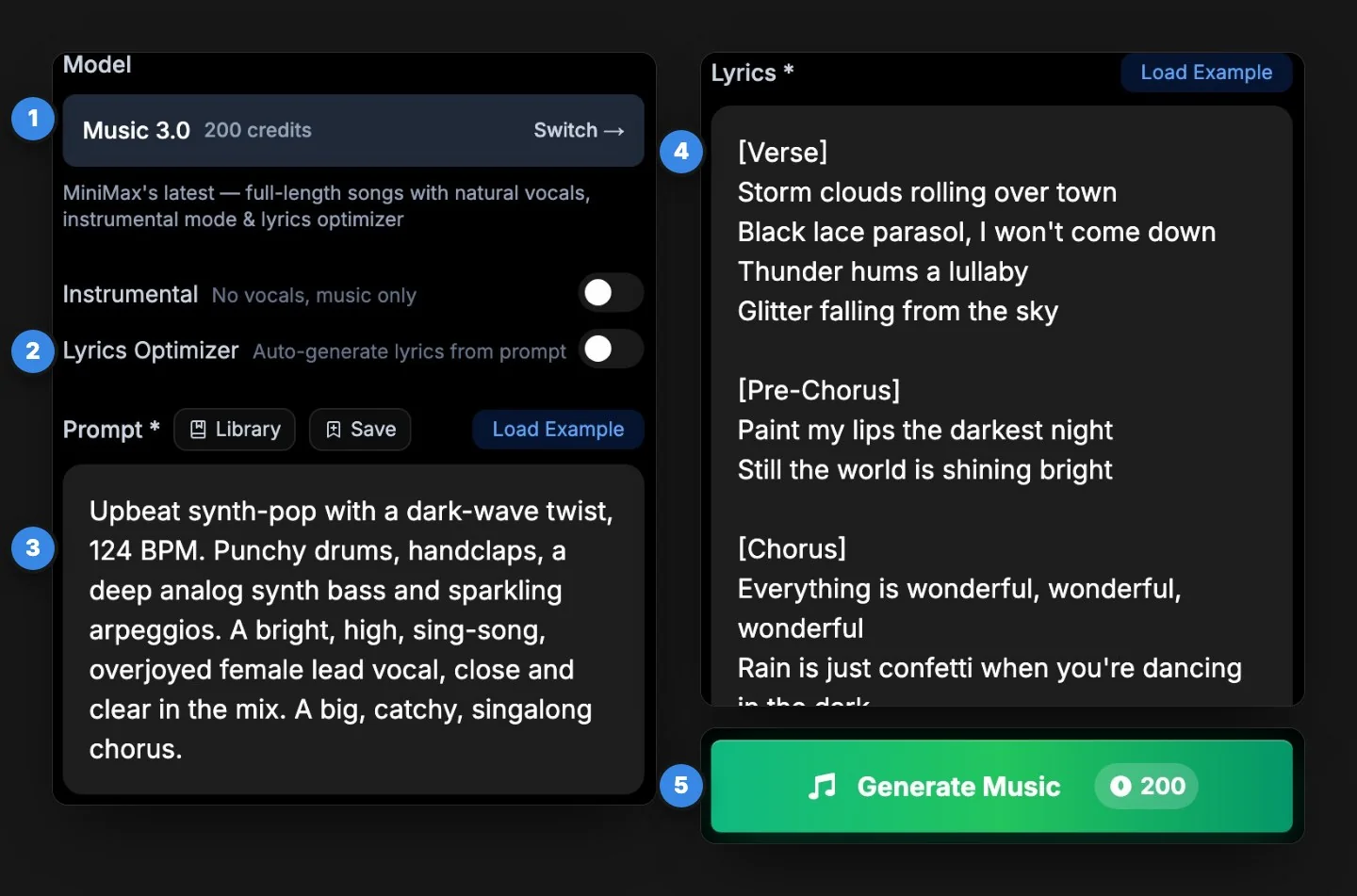
- Switch off Lyrics Optimizer to use your own words. With it on, the model writes the lyrics from your style prompt.
- Describe the style in a sentence or two: genre, tempo, instruments and the voice. Ours: "Upbeat synth-pop with a dark-wave twist, 124 BPM. Punchy drums, handclaps, a deep analog synth bass and sparkling arpeggios. A bright, high, sing-song, overjoyed female lead vocal, close and clear in the mix. A big, catchy, singalong chorus."
- Paste your lyrics with section tags such as [verse], [pre-chorus] and [chorus]. Short lines are easier to sing, and a chorus that repeats the title is easier to remember.
- Make two takes and keep the clearer one. Our first take sang every word clearly. In the second, the words were hard to make out, and mumbled vocals make weak lip sync later.
Here's the take we kept:
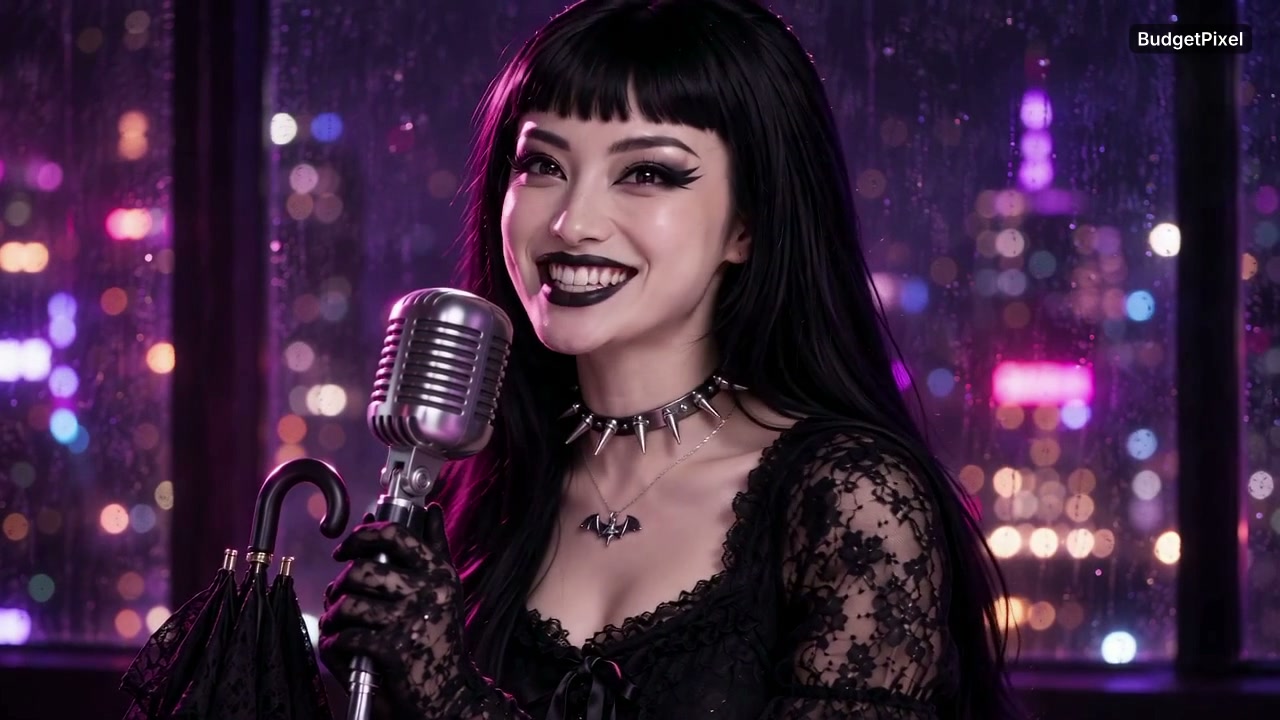
Everything Is Wonderful
Made with Music 3.0 · 1:24
Other song models do the same job at other prices: Mureka V9 sings your exact lyrics with a choice of male or female vocals for 60 credits, and Lyria 3 makes songs with vocals for 100.
Step 2: Pick a singer who looks the same in every shot
A music video cuts between shots, so the singer has to be the same person in every one. The easy way is a character: a saved face and look you call into a prompt with an @handle, on any model that supports characters (the image and video models in this guide both do).
We cast Sunny (@sunny), one of BudgetPixel's AI influencers. She looks like the end of the world and acts like a birthday party: full goth, black lipstick, a black lace parasol and a sparkly pink unicorn backpack, with a high, sing-song voice that doesn't match her look at all. Her catchphrase, "Everything is wonderful!", became the song.
The AI influencers are free to cast; credit them when you post ("Sunny, a BudgetPixel AI influencer"). To star in your own video, make a character from your photos in Characters and use its handle the same way.
Step 3: Make a still of the singer for each camera angle
The lip-sync model animates a picture, so start with a picture of your singer at the microphone. We wrote one prompt in the Image Workshop on GPT Image 2.5 Flare, with the Aspect Ratio at 16:9, the size at 2K and Number of Images at 2:
@sunny sings into a vintage chrome studio microphone on a stand, framed from the chest up at a slight three-quarter angle, looking just past the camera, in a dark recording studio at night. A soft pink key light on her face, deep purple shadows, rain on the window behind her and blurred city lights through it. She is mid-chorus, lips parted, eyes bright and joyful. The microphone sits just below her chin and does not cover her mouth. Her closed black lace parasol hangs from the microphone stand. Cinematic music-video still, shallow depth of field, rich color, no text.
Try this prompt in the Image Workshop and set those three before you generate.
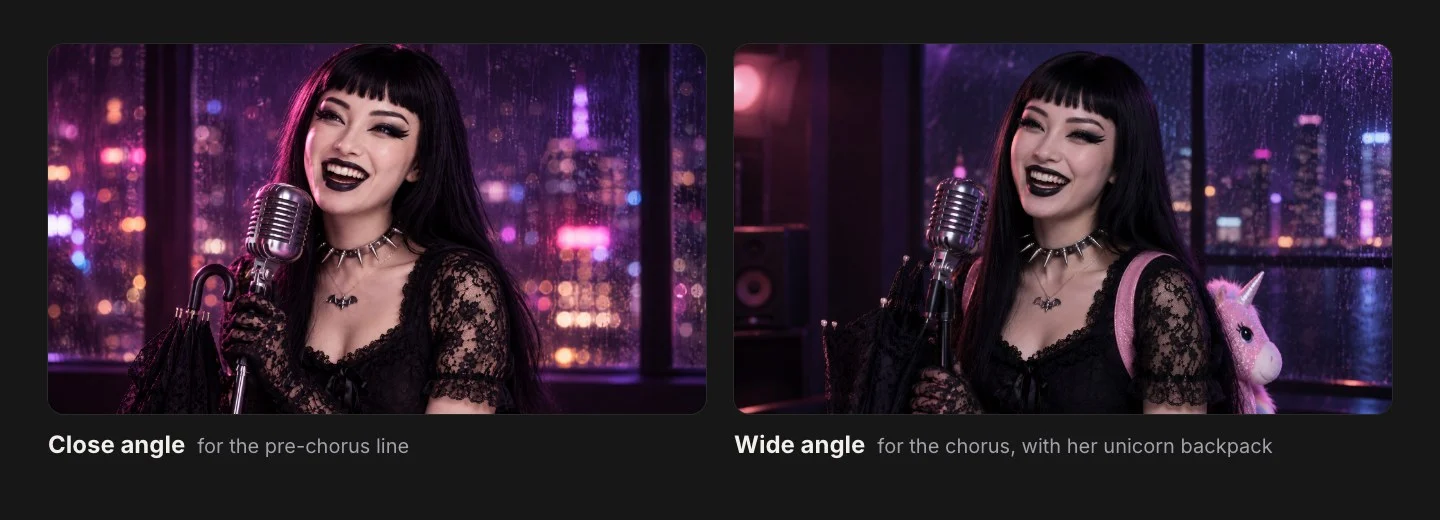
The two pictures came back framed differently, which gave us a close and a wide shot from one prompt. That was luck: to be sure of a wide shot, ask for one, such as "framed from the waist up, with the whole microphone stand in view".
Three things make a still easy to lip-sync: the face turned toward the camera, the mouth fully visible (keep the microphone below the chin), and the picture already in the shape the video will play. Each picture cost 80 credits at 2K and the default Medium quality; High is 160.
Step 4: Make her sing with lip sync
Each still now sings one part of the song. Cut the song into parts in any audio editor, starting each one where a sung line begins (a moment early is better than a moment late, so the first word isn't clipped). Write down where each part starts in the song; you'll need it in Step 6. Our close shot sings "Still the world is shining bright", 37.5 to 45 seconds into the song, and the wide shot the first two lines of the chorus, 45 to 53.2.
Then open Lip-Sync in the Video Workshop:
- Choose OmniHuman 2.0.
- Upload the still.
- Upload that part of the song: an MP3 or WAV under 5 MB and up to 2 minutes long. Use MP3 for anything over about 25 seconds, since WAV files get big fast.
- If you like, describe the movement, such as "She sings the chorus with big happy energy, head moving to the beat; slow camera orbit."
- Check the price and generate. It's 84 credits per second of audio, rounded up, with a 4-second minimum, so our 8.2 seconds of chorus cost 756.
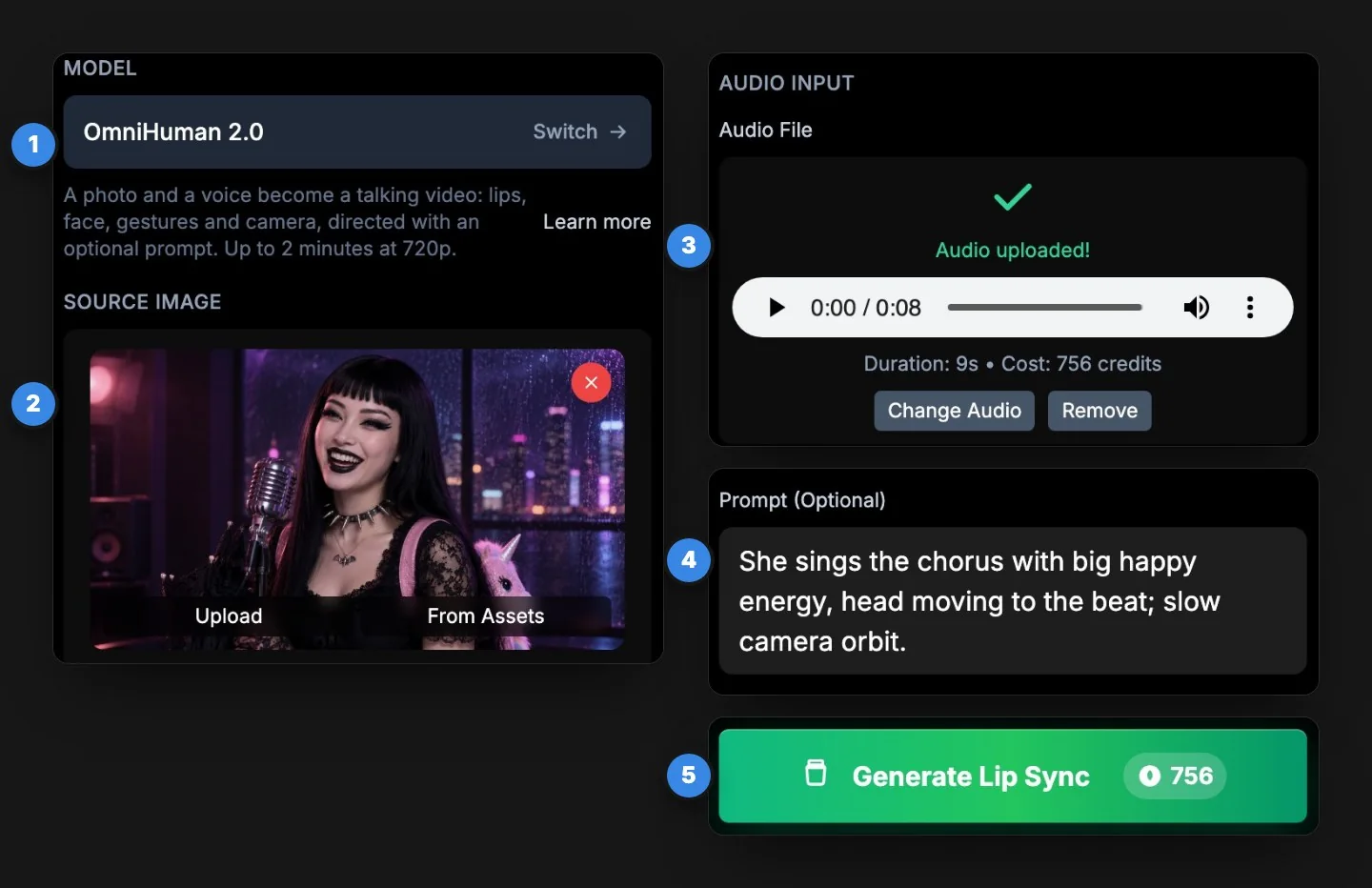
Each clip took three to four minutes and came back at 720p, with her lips, face and head moving to the vocals. The model finds the voice inside the full mix, so you don't need a separate vocal track. Each clip also comes back rounded up to the next whole second, with its part of the song as its sound; you'll trim and mute that in the edit.
Step 5: Shoot the story around the song
Lip sync carries the singing; story shots give the video a place and a mood. In the Video Workshop, pick Seedance 2.5, write the prompt with the same character, and set the Duration, Aspect Ratio and Resolution.
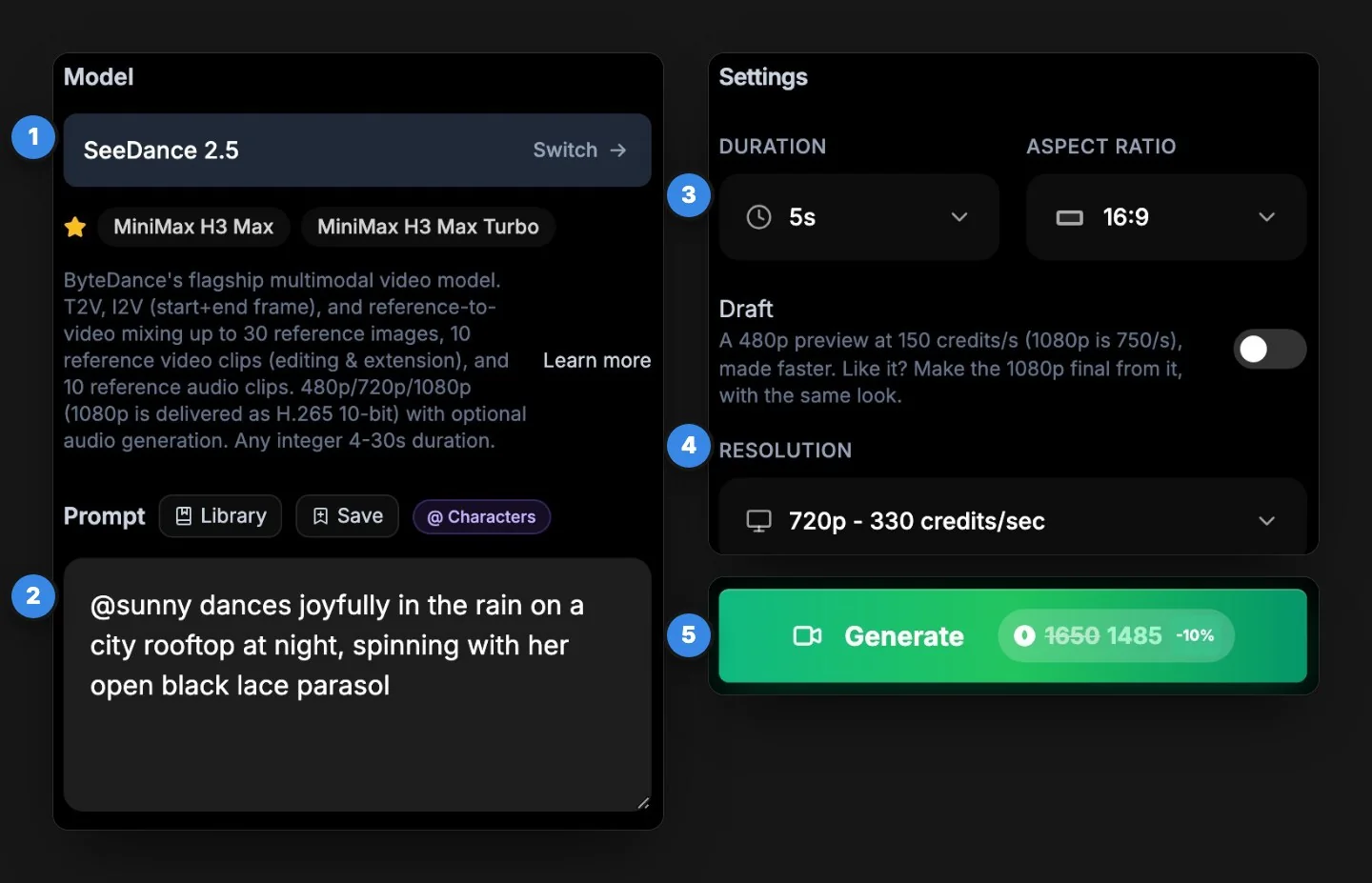
Our two prompts:
@sunny.full_body walks slowly toward the camera down a rain-soaked neon street at night under her open black lace parasol, storm light flickering, puddles reflecting pink and blue signs, her black platform boots stepping through the shine. Then she looks up and turns to the camera with a huge, beaming smile. Cinematic music video, slow dolly back, shallow depth of field. No text, no logos anywhere.
@sunny.full_body dances joyfully in the rain on a city rooftop at night, spinning with her open black lace parasol, her black lace dress and petticoats twirling, the sparkly pink unicorn backpack bouncing, city lights glowing pink and violet behind her. She laughs with her arms out as raindrops glitter in the light. Cinematic music video, handheld camera circling her. No text, no logos anywhere.
Try the street prompt or the rooftop prompt in the Video Workshop.
We wrote @sunny.full_body rather than @sunny: the tag sends her full-length picture instead of her portrait, so the boots, dress and backpack carry over into wide shots. Type @sunny. in the prompt box to see her other pictures.
The first prompt borrows a note from Sunny's character page: start dark and moody, then she turns to the camera beaming. Every AI influencer's page has directing notes like that, and they're worth reading before you write. Each shot ran 5 seconds at 720p, 1,650 credits. To try a prompt for less, switch on Draft: a 480p preview at 150 credits a second. If you like the draft, the workshop makes the 1080p final from it.
Step 6: Cut it to the beat
Put the song on a timeline in any video editor and lay the clips over it. Our video uses 26 seconds of the song, from 0:33 to 0:59: the pre-chorus and the first chorus. Three rules do most of the work:
- Cut on a hit. Drum hits are the spikes in your editor's waveform. If they're hard to see in a busy mix, count the beat instead (ours came out at 120 beats a minute, a beat every half second, though we asked for 124) or use your editor's beat detection. Land each cut on a hit, and save the changes of shot for where a sung line starts: our close-up comes in with "Still the world is shining bright" and the wide shot with the first word of the chorus.
- Put each lip-sync clip where its audio came from. Our close-up was made from 37.5 to 45 seconds of the song, so it sits exactly where that part of the song plays, 4.4 seconds into our video. Start it a few frames off and the lips run ahead of or behind the words.
- Make the song the only sound. Mute the lip-sync clips and the story shots, which come back with sound of their own, and trim the extra fraction of a second off the end of each lip-sync clip.
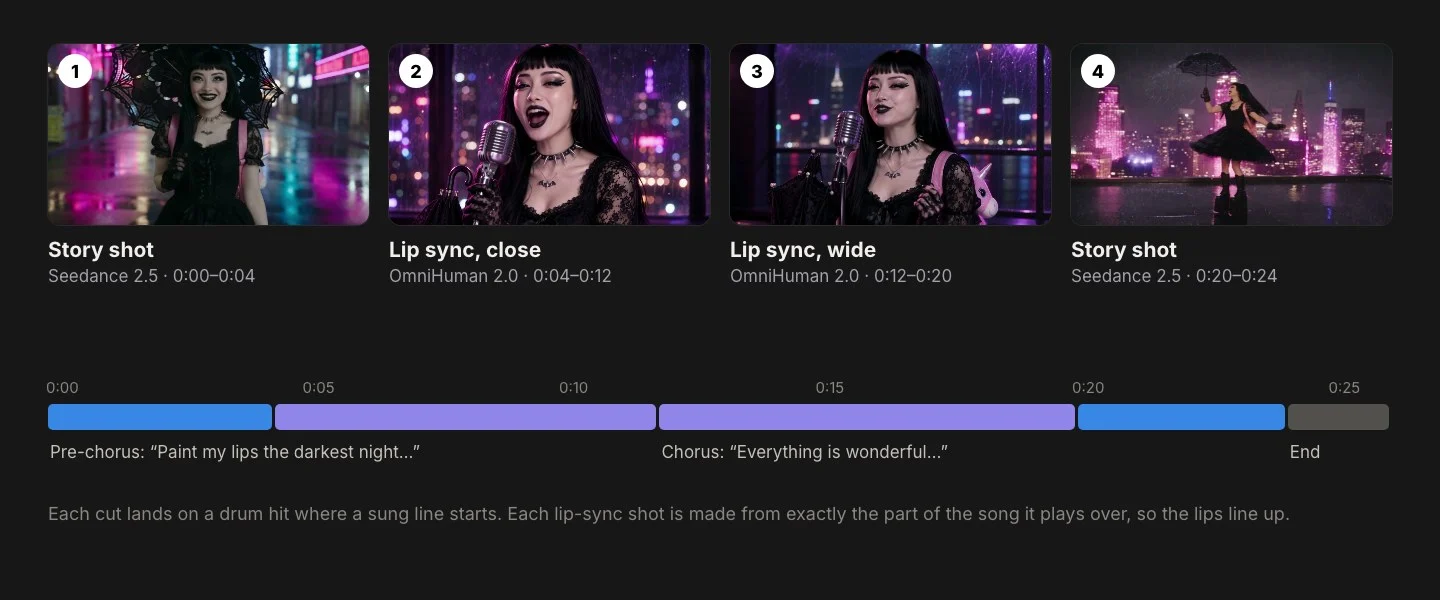
We ended on a two-second title card.
What does an AI music video cost?
About $5: our 26-second video cost 5,288 credits at standard prices.
| Part | What we made | Credits |
|---|---|---|
| Song | Two takes on Music 3.0 | 400 |
| Singer stills | Two pictures on GPT Image 2.5 Flare at 2K | 160 |
| Lip sync | 7.5 and 8.2 seconds on OmniHuman 2.0, billed as 8 and 9 | 1,428 |
| Story shots | Two 5-second shots on Seedance 2.5 at 720p | 3,300 |
| Total | 26 seconds of finished video | 5,288 |
Dollar amounts use the credit-pack rate of 1,000 credits per $1; plan credits cost less, and Ultra takes 10% off Seedance. Ways to spend less:
- Make it all singing. One still lip-synced to 20 seconds of the song comes to about 2,000 credits with the song and the still.
- Draft the story shots at 480p, 150 credits a second, until the prompt works. The final made from a draft is 1080p (750 credits a second) and keeps the same shot; for 720p, run the finished prompt again with Draft off.
- Use a cheaper song model. Mureka V9 makes a song with vocals for 60 credits.
Tips for a better AI music video
- One singer per lip-sync shot, facing the camera, with the mouth uncovered.
- Make each shot in the shape it will play. 16:9 for YouTube; for TikTok, Reels and Shorts, make the stills and the story shots in 9:16.
- Name the signature look in every story prompt. Sunny's parasol, platform boots and unicorn backpack are what make her recognizable from across a rooftop.
- Keep the light the same across shots. Every prompt we wrote is night, rain and pink and violet light, so the cuts feel like one place.
- Let the chorus land on the singing. Viewers watch the singer's mouth on the words they know, so save your best lip-sync shot for the chorus.
Can you use an AI music video commercially?
Yes, if the song model's terms allow it. Each music model's maker sets its own rules for commercial use, so check them before you put a track in an ad: Music 3.0's page on BudgetPixel, for example, explains that commercial use follows MiniMax's music terms. If you cast a BudgetPixel AI influencer, credit them when you post, and never show them in sexual content. And label the video as AI-generated where the platform asks: YouTube asks creators to disclose realistic AI-made content, and TikTok has its own AI label.
Questions people ask
Can AI make a music video?
Yes. One AI model makes the song, an image model pictures the singer, a lip-sync model makes her sing, and a video model makes the scenes around her. On BudgetPixel all four are on one account: Music 3.0 for the song, GPT Image 2.5 Flare for the singer's stills, OmniHuman 2.0 for the singing and Seedance 2.5 for the scenes.
How much does an AI music video cost?
Our 26-second video cost 5,288 credits at standard prices, about $5.29 at the credit-pack rate: 400 for two song takes, 160 for two singer stills, 1,428 for two lip-sync clips (17 billed seconds) and 3,300 for two 5-second story shots. A singing-only version, one still lip-synced to 20 seconds of the song, is about 2,000 credits.
How do I make an AI singer sing my song?
Make a picture of the singer, then upload it with a part of your song to a lip-sync model such as OmniHuman 2.0. It moves the lips, face and head to the vocals at 720p, for 84 credits per second of audio. In the web form, the audio file must be under 5 MB and up to 2 minutes long.
Can I use my own lyrics?
Yes. In Music 3.0, switch off Lyrics Optimizer and paste your lyrics, with tags like [verse] and [chorus] to shape the song. With the optimizer on, it writes the lyrics from your prompt instead.
How do I keep the singer looking the same in every shot?
Cast a character with an @handle, such as @sunny, in every image and video prompt, on models that support characters. The character's pictures go with each generation, so the face, hair and outfit carry over from shot to shot. A tag such as @sunny.full_body sends a full-length picture for wide shots.
How long can an AI music video be?
As long as your song. Each OmniHuman 2.0 lip-sync clip can run up to 2 minutes, Seedance 2.5 story shots run 4 to 30 seconds, and Music 3.0 writes a full song (ours ran 1:24). A longer video is just more clips on the timeline.
Can I use an AI music video commercially?
Yes, if the song model's terms allow it. Each music model's maker sets its own rules for commercial use; Music 3.0's page on BudgetPixel, for example, explains that commercial use follows MiniMax's music terms. If you cast a BudgetPixel AI influencer, credit them when you post, and label the video as AI-generated where the platform asks.
What size should an AI music video be?
Make every shot in the shape it will play: 16:9 for YouTube, 9:16 for TikTok, Reels and Shorts. Set the aspect ratio on the singer stills and the story shots before you generate.
Try it yourself
Music 3.0 makes a full song with vocals for 200 credits. The price shows before you start.