Canva Pro Price in 2026: What You Pay and What You Get
Canva Pro costs US$144 a year (US$12 a month, billed yearly) or US$18 a month if you pay month to month, for one person, as of October 2026. Canva Business is US$250 a year or US$25 a month per person. Pro adds premium templates and stock, Magic Resize, transparent PNG and SVG downloads, more brand kits and more AI uses. If you mainly need templates and AI help without watermarks, a free plan elsewhere may cover it.
 By BudgetPixel Team8 min readFacts verified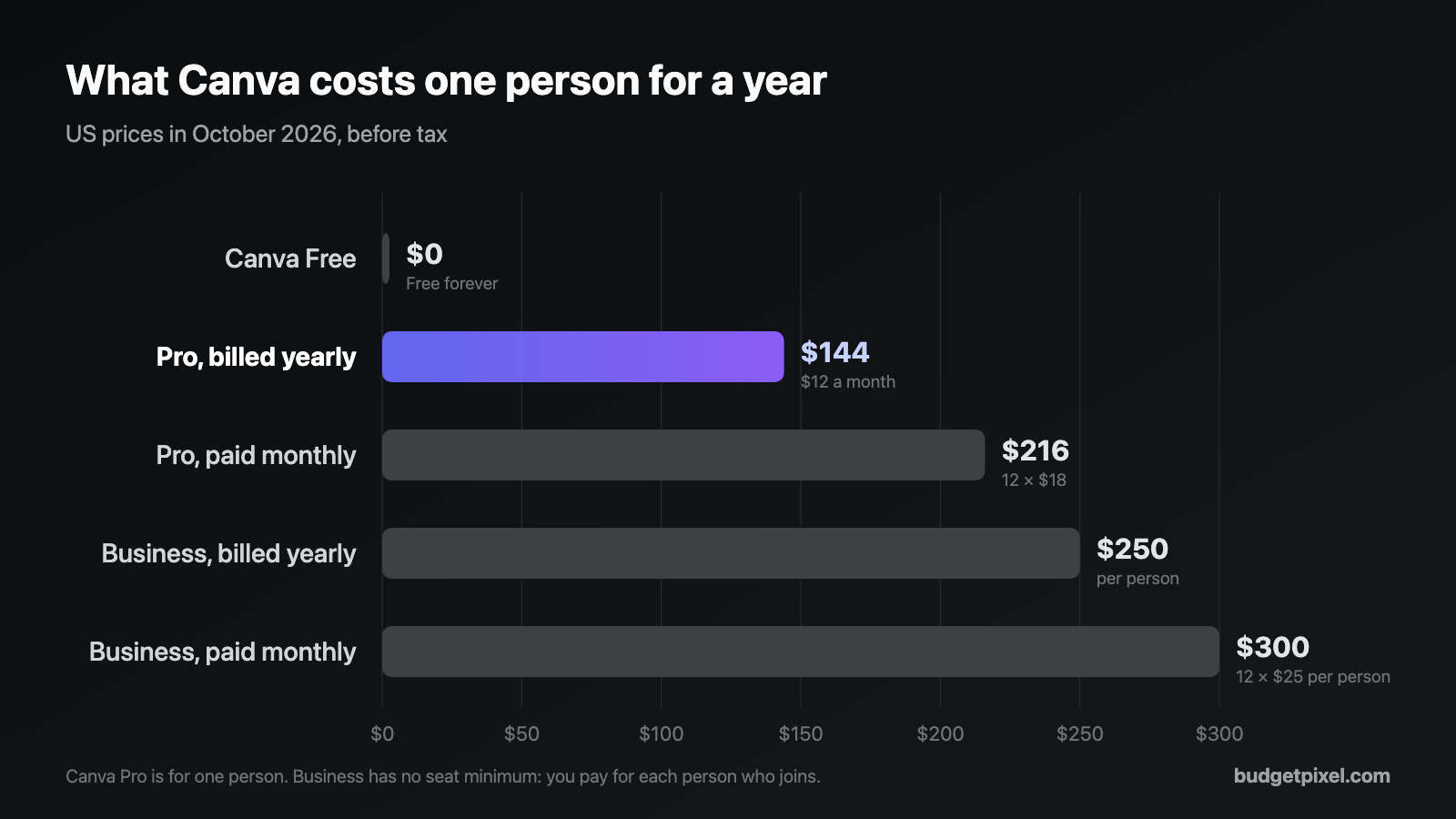
On this page
Canva Pro costs US$144 a year (US$12 a month, billed yearly) or US$18 a month if you pay month to month. That's the US price for one person in October 2026. Below: every Canva plan side by side, how the price has moved, what Pro adds over the free plan, and how to get most of it for free if you don't need the whole package.
How much does Canva Pro cost in 2026?
Here's what each Canva plan costs in the US, before tax, as of October 2026:
| Plan | Price | Who it's for |
|---|---|---|
| Free | US$0 | Anyone; 1.6 million+ templates, 5 GB of storage |
| Pro | US$18 a month, or US$144 a year | One person |
| Business | US$25 a month, or US$250 a year, per person | Teams of any size; no seat minimum |
| Enterprise | Custom quote | Large organisations |
| Education and Nonprofits | Free, if eligible | K-12 schools; approved nonprofits (up to 50 people) |
Prices vary by country, so the figure on your screen may not be in US dollars. Canva also runs introductory discounts, so check the pricing page before you subscribe.
Is Canva Pro cheaper if you pay yearly?
Yes, by a third. Twelve months at US$18 come to US$216, while the yearly plan is US$144: you save US$72. The catch is that the yearly fee is charged in full when you upgrade, and again at every renewal.
If you only need Pro for a project, say a month of event posters, the monthly plan is the cheaper way to try it. Canva also gives new subscribers a 30-day free trial, though during the trial the AI allowance is the same as the free plan's.
Has the Canva Pro price changed?
Yes, more than once. In 2025 Canva Pro cost US$120 a year, or US$15 month to month. By February 2026 it was US$144 a year; no source we found dates the rise exactly. Then, from about July 28 to September 11, 2026, price trackers saw US$180 a year on Canva's US pricing page, before it went back to US$144.
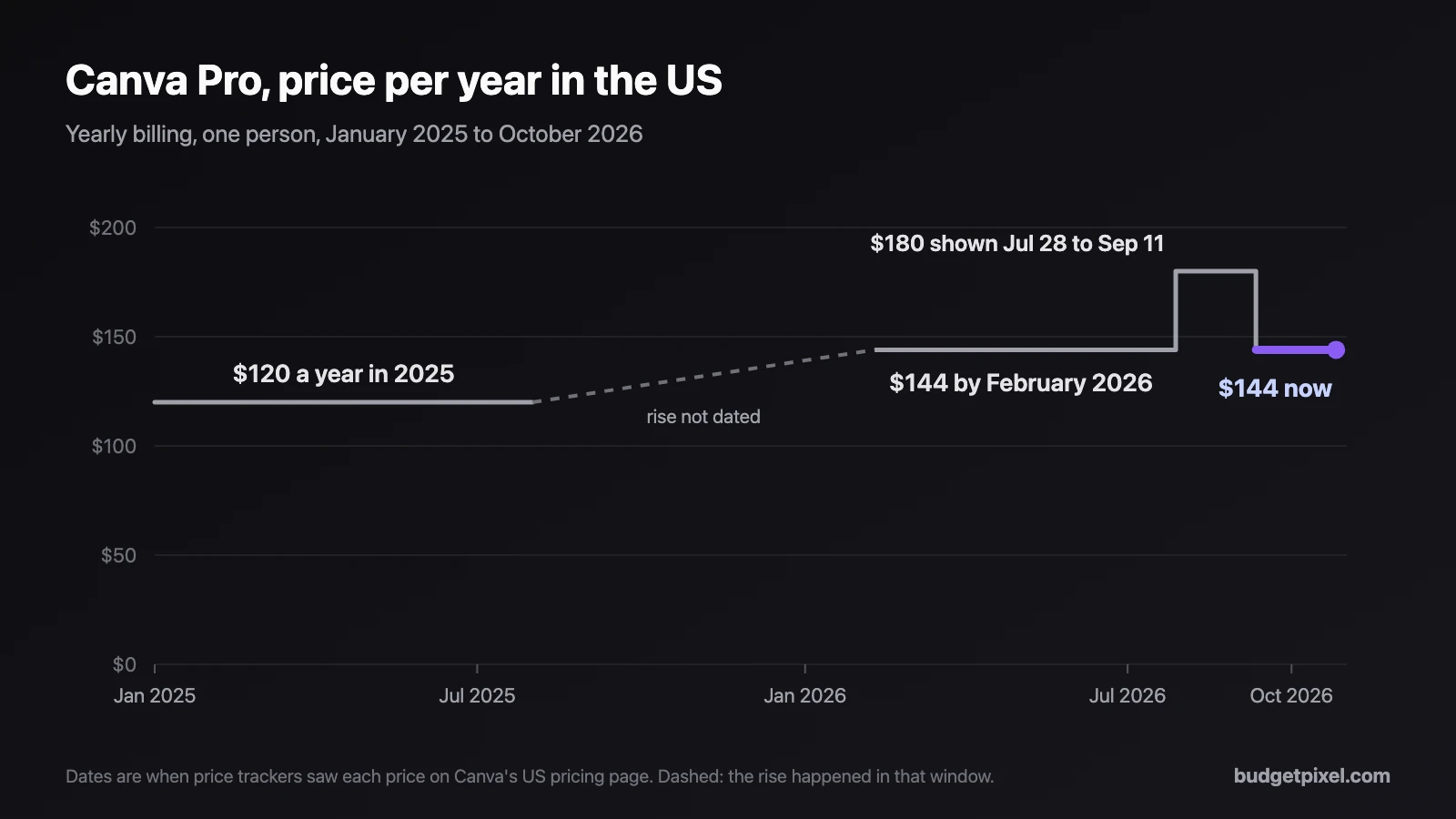
That's why articles online disagree: depending on when they were written, you'll see US$120, US$144 or US$180 a year. Teams changed too: in 2024 Canva raised Canva Teams prices sharply, and in late 2025 it replaced Teams with Canva Business for new buyers. Existing Teams subscribers keep their plan.
What do you get with Canva Pro?
Canva's free plan is generous, so the question is really what Pro adds. From Canva's own pricing and help pages:
| Feature | Canva Free | Canva Pro |
|---|---|---|
| Templates | 1.6 million+ | 3.6 million+, including premium |
| Photos, videos, graphics, audio | 4.7 million+ | 141 million+ premium items |
| Premium items in a design | Watermarked until you pay for them | Included |
| Magic Resize (one design into many sizes) | No | Yes |
| Background Remover | Limited, within the 20 AI uses | Yes, up to 500 images a day |
| Download formats | PNG, JPG, PDF, MP4, GIF, PPTX | Adds transparent PNG and SVG |
| Brand kits | 1 (three colours) | 5 |
| Upload your own fonts | No | Yes |
| Schedule posts to social networks | No | Yes |
| Storage | 5 GB | 100 GB |
| AI uses a month | Up to 20 | Up to 200 Premium or 20 Ultra |
Two things in that table surprise people. First, a free design isn't watermarked; only premium items you add to it are, until you license them one by one or upgrade. Second, Pro's AI isn't unlimited: Canva sorts its AI tools into Standard, Premium and Ultra, and Pro caps the Premium and Ultra ones each month.
How many AI uses does Canva Pro include?
According to Canva's help center:
- Free: up to 20 uses a month of Canva's AI tools in total.
- Pro: Standard tools aren't counted (fair use applies), plus up to 200 Premium or 20 Ultra uses a month.
- Business: up to 400 Premium or 40 Ultra uses a month per person.
On paid plans, Standard tools such as Magic Write don't count toward the allowance; on Free they share the 20 uses. Heavy users can buy Canva's AI Pass, US$100 a month per person on top of Pro or Business. Canva's AI terms describe these limits as operational controls it can adjust, and price trackers saw them change in September 2026, so treat the numbers as a snapshot.
Canva Pro or Canva Business: which do you need?
Pro is one person's account. Business is for two or more people who share a brand: up to 100 brand kits, 500 GB of storage per person and twice Pro's AI allowance. It costs US$25 a month or US$250 a year per person, and you only pay for members who accept an invite.
A freelancer or a solo shop owner rarely needs Business. A team of three on Business pays US$750 a year. Three separate Pro accounts would cost US$432, but they aren't a shared team workspace.
What can you get for free instead?
People usually upgrade to Pro for one or two features, not all of them. Here's how each common reason maps to BudgetPixel's Design Studio, which is free to use on its free plan:
| Why people pay for Pro | Canva Pro | BudgetPixel, free plan |
|---|---|---|
| More templates, no premium lock | Premium templates included | All 2,000+ templates free, personal and commercial use |
| No watermarks | Premium items unlocked | No watermark on any download |
| Background removal | Included | 25 credits a picture; the free 300 monthly credits cover 12 |
| Resize a design for other formats | Magic Resize, one click | Ask the AI designer to rebuild it in the new size (free chat) |
| Transparent PNG | Included | Cut-outs and other layers with a transparent background download as transparent PNGs |
| Brand kits | 5 | Up to 20, colours, fonts and logo |
| AI that edits your design | Canva AI, within monthly caps | AI designer chat, free with a daily limit |
| SVG download, font upload, scheduling | Included | Not available |
The resize row deserves a closer look, because it's the feature people miss most. In this test we asked BudgetPixel's AI designer for "a matching Instagram story next to this post, with the same photo, colours and words". It built a new 1080 × 1920 frame with the same photo, colours and words, checked it and fixed its own layout, in about two and a half minutes:
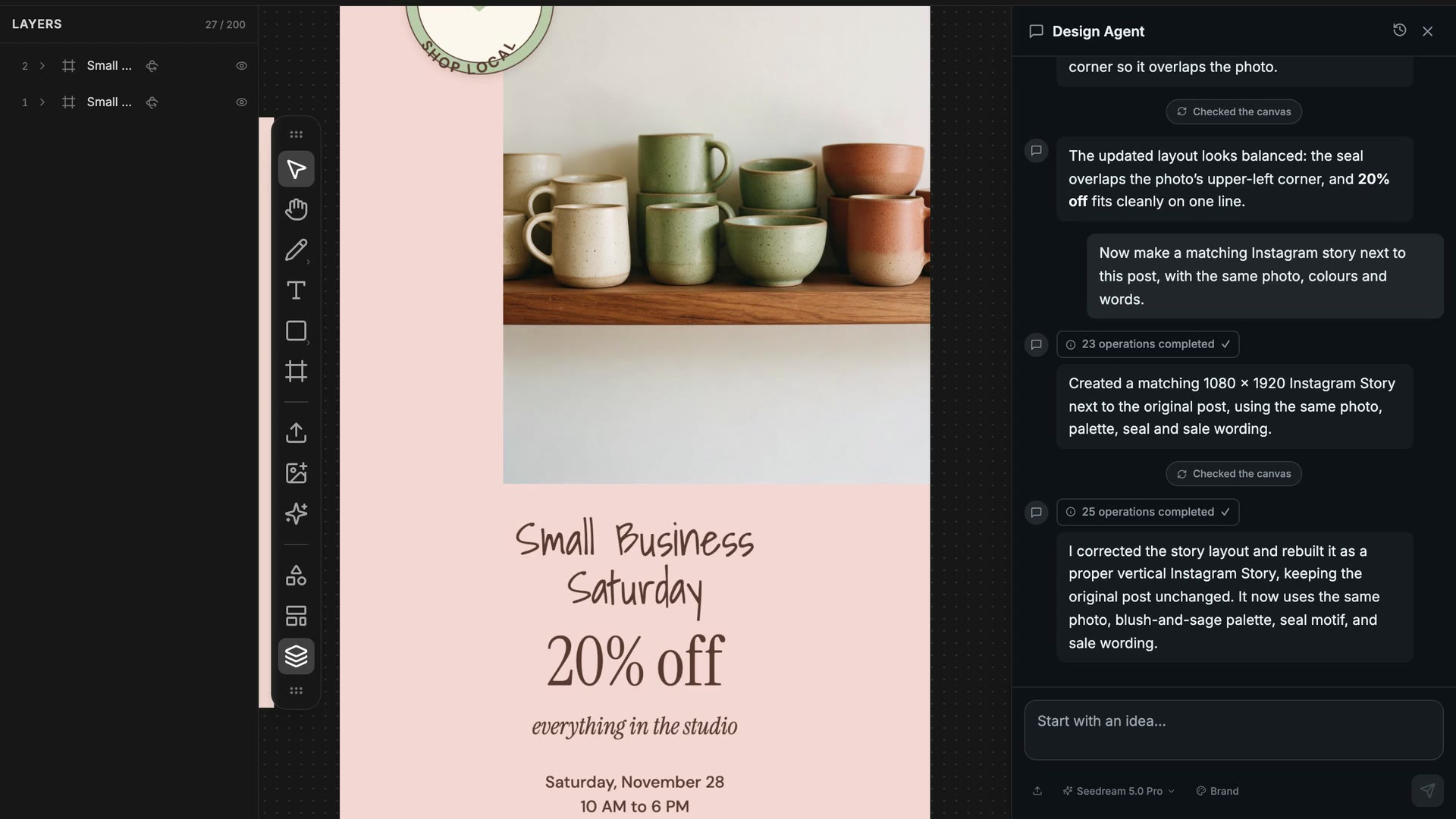
It isn't one click, and you should check the result, but the chat costs nothing. The templates are free too: open any of them, change the words and download.
Is Canva Pro worth it?
It depends on how you design. Canva Pro is worth it if:
- You design every week and use the premium photos, videos and templates.
- You turn one design into many formats often; Magic Resize saves real time.
- You need SVG files, your own brand fonts or scheduled posting.
- You edit video, make presentations or order prints in the same place.
You can probably skip it if:
- You make a few posts, flyers or thumbnails a month and free templates cover you.
- What you want most is AI that builds and edits designs for you; on BudgetPixel that chat is free on every plan.
- You'd rather pay for AI pictures as you use them (from 12 credits each) than pay a subscription.
Canva's free plan also stays a strong option: 1.6 million templates, PDF and video downloads, real-time collaboration and mobile apps cost nothing. Pro is for when you hit its limits.
What does BudgetPixel cost, for comparison?
BudgetPixel has no paid design plan; Design Studio works on every plan, and credits pay for AI pictures and image tools:
| Plan | Price | Credits a month |
|---|---|---|
| Free | US$0 | 300 |
| Basic | US$10 a month, or US$100 a year | 11,000 |
| Premium | US$22 a month, or US$200 a year | 25,000 |
A new 1K picture on the default model costs 55 credits, about US$0.06 at the credit-pack rate of 1,000 credits per US$1; removing a background costs 25. Designs made from templates can be used commercially on any plan. New AI pictures follow your plan's terms: personal use on Free, limited commercial use on Basic, full commercial use on Premium and up. Current prices are on the pricing page.
How we checked
- Date and place: Canva prices are US prices in US dollars, checked on October 26, 2026.
- Sources: Canva's own pricing, help and newsroom pages, cross-checked against independent price trackers dated October 2026. Canva's pricing page blocks automated readers, so where it shows a slightly different figure in your country or on a promotion, the page wins.
- BudgetPixel: features tested in Design Studio on October 26, 2026; prices from our pricing page.
Sources
- Canva: pricing, Pro vs Enterprise, AI access and limits, AI Pass, download file types, premium elements, Business billing, Canva Business launch, Education, Nonprofits
- Price history: PricingSaaS, Canva, Moda (September 2026), CostBench (October 2026), TechCrunch on the 2024 Teams price rise
- BudgetPixel: Design Studio, pricing, license
Questions people ask
How much is Canva Pro per month?
In the US, Canva Pro costs US$18 a month if you pay month to month, or the equivalent of US$12 a month if you pay US$144 for a year up front (October 2026). The price covers one person; prices differ by country and exclude tax.
Is Canva Pro cheaper if you pay yearly?
Yes. Twelve monthly payments of US$18 come to US$216, while the yearly plan is US$144, a third less. The catch is that you pay the whole year when you subscribe.
Does Canva Pro have a free trial?
Yes, 30 days. During the trial you get the Pro features, but the AI allowance is the same as the free plan's. If you add a payment method, Canva charges it when the trial ends unless you cancel first.
What is the difference between Canva Pro and Canva Business?
Pro is for one person. Business is priced per person (US$25 a month or US$250 a year each), has no seat minimum, and adds team tools: up to 100 brand kits, 500 GB of storage per person and twice Pro's AI allowance.
Did Canva Pro go up in price?
Yes. It was US$120 a year, or US$15 month to month, in 2025, and US$144 a year by February 2026. Price trackers also saw US$180 a year on Canva's US page from late July to mid-September 2026, before it returned to US$144.
How many AI uses does Canva Pro include?
Canva's help center lists up to 200 Premium or 20 Ultra AI uses a month on Pro, with Standard tools under fair use. The free plan gets up to 20 uses a month in total. Canva describes these limits as ones it can adjust.
Is Canva Pro free for students, teachers or nonprofits?
K-12 teachers and their students can use Canva for Education for free, and approved nonprofits get Pro features free for a team of up to 50 people. University students aren't covered by Canva for Education, though some get premium features through their school's Canva Campus licence; anyone can use Canva Free.
Is there a free alternative to Canva Pro?
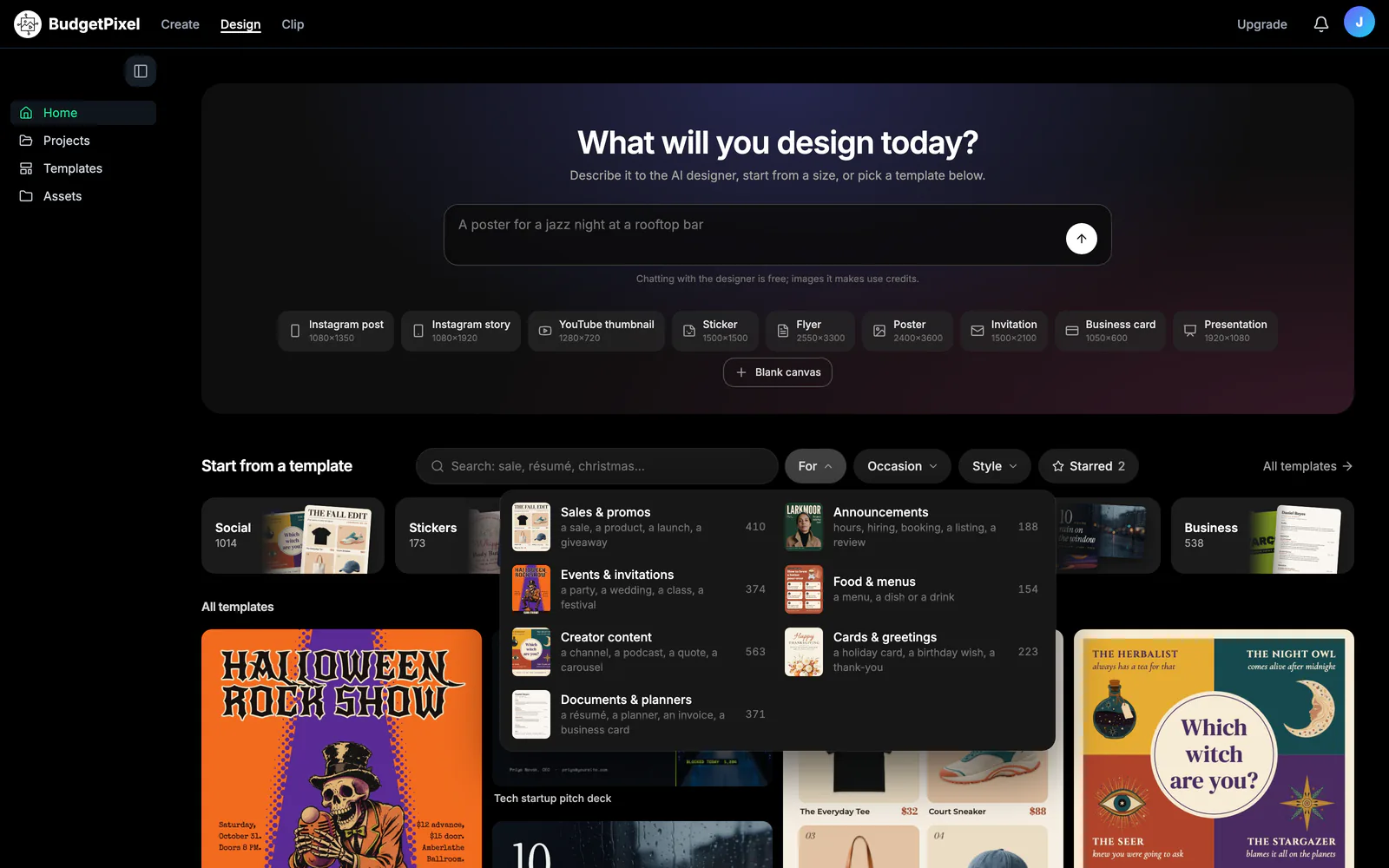
For templates and AI-assisted design, yes. BudgetPixel's Design Studio has more than 2,000 templates that are all free for personal and commercial use, downloads with no watermark, and an AI designer whose chat is free on every plan. You pay credits only for AI pictures and image tools.
See for yourself
Templates and the AI designer's chat are free. AI pictures cost credits, from 12.