BudgetPixel vs Canva (2026): Which One Should You Use?
Canva is the bigger, all-round tool: millions of templates, video, presentations, print, mobile apps and team features. BudgetPixel's Design Studio is the narrower, AI-first one: more than 2,000 templates that are all free for commercial use, an AI designer whose chat is free on every plan and edits the same layers you do, an infinite canvas for every size of a campaign, and a 3D view of every layer. Pick Canva for breadth and teamwork; pick BudgetPixel to design with AI without a subscription.
 By BudgetPixel Team10 min readFacts verified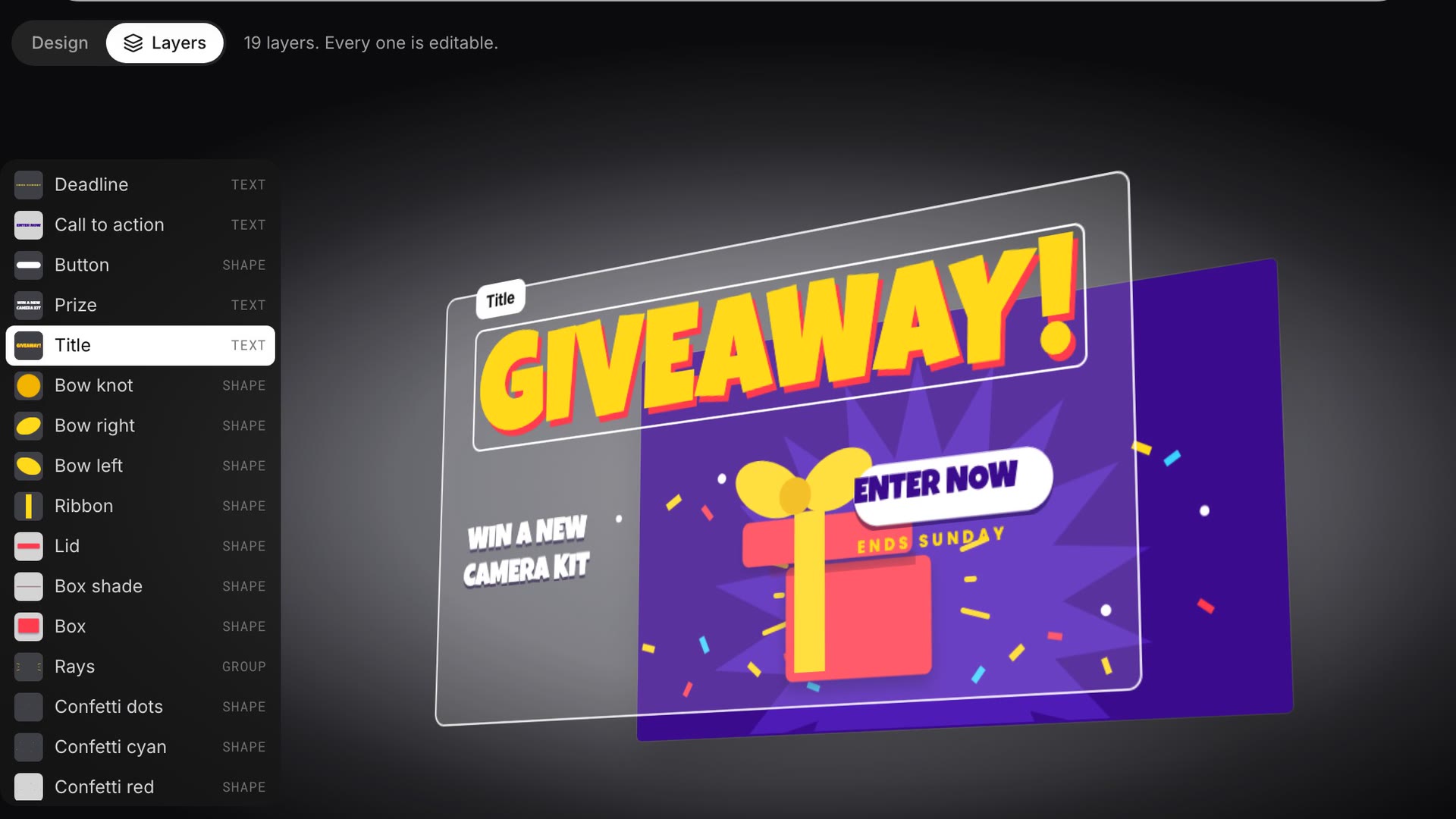
On this page
Canva is the bigger, all-round design tool. BudgetPixel's Design Studio is the AI-first one: free templates, an AI designer that edits real layers, and one canvas for every size of a campaign. We tested Design Studio in October 2026 and compared it with Canva's own pricing and help pages. Here's where each one wins.
How do BudgetPixel and Canva compare at a glance?
| BudgetPixel Design Studio | Canva | |
|---|---|---|
| Free templates | 2,000+, all free, commercial use OK | 1.6 million+ free, more on Pro |
| Premium tier | None | Pro, US$144 a year |
| AI that builds a design | AI designer, free chat on every plan | Canva AI and Magic Design, monthly AI caps |
| AI that edits your design | Yes, by layer, on every plan | Canva AI chat, on paid plans |
| Image models | 11 to choose from | Canva's own, plus partner apps |
| Canvas | Infinite: frames of any size side by side | Pages; Whiteboards are infinite |
| Layers | Numbered panel and a 3D view | Layers panel |
| Flat image into layers | Decompose, 55 credits a layer | Magic Layers, counts as an AI use |
| Downloads | PNG, JPG, WebP; transparent layers | PNG, JPG, PDF, MP4, GIF, PPTX; SVG on paid plans |
| Video, slides, print | No | Yes |
| Phone apps | Browse only | iOS and Android |
| Teamwork | No | Yes |
The pattern is clear: Canva does more kinds of things, while BudgetPixel goes deeper on AI and on layers. The sections below show what that means in practice.
Are the templates free?
On BudgetPixel, every template is free. There are more than 2,000, for Instagram posts and stories, YouTube thumbnails, flyers, posters, invitations, stickers, business cards and more, and you can use what you make with them for personal or commercial work without a credit line. There's no premium tier, so nothing in a template turns into a watermark.
Canva's library is far bigger: more than 1.6 million templates on the free plan and over 3.6 million on Pro. Its free designs aren't watermarked either, but premium photos and elements inside a template are, until you pay for each one or upgrade. If you need the widest possible choice, Canva wins; if you want everything you see to be free, BudgetPixel does.
On every BudgetPixel template page you can also switch from Design to Layers and watch the template come apart, as in the video at the top of this page. It's the quickest way to see what you'll be able to change.
Who does the designing: you or the AI?
Both tools now have AI that makes editable designs, so the real differences are what the AI can change afterwards, and what it costs.
On BudgetPixel, the AI designer sits in a chat beside your canvas. It can build a design from a one-line brief, or change one you already have, layer by layer. We opened a free Small Business Saturday template and asked: "Make it 20% off, and move the round seal to the top left so it overlaps the corner of the photo." It retyped the offer, moved the seal over the photo, then took a screenshot of the canvas to check its own work:
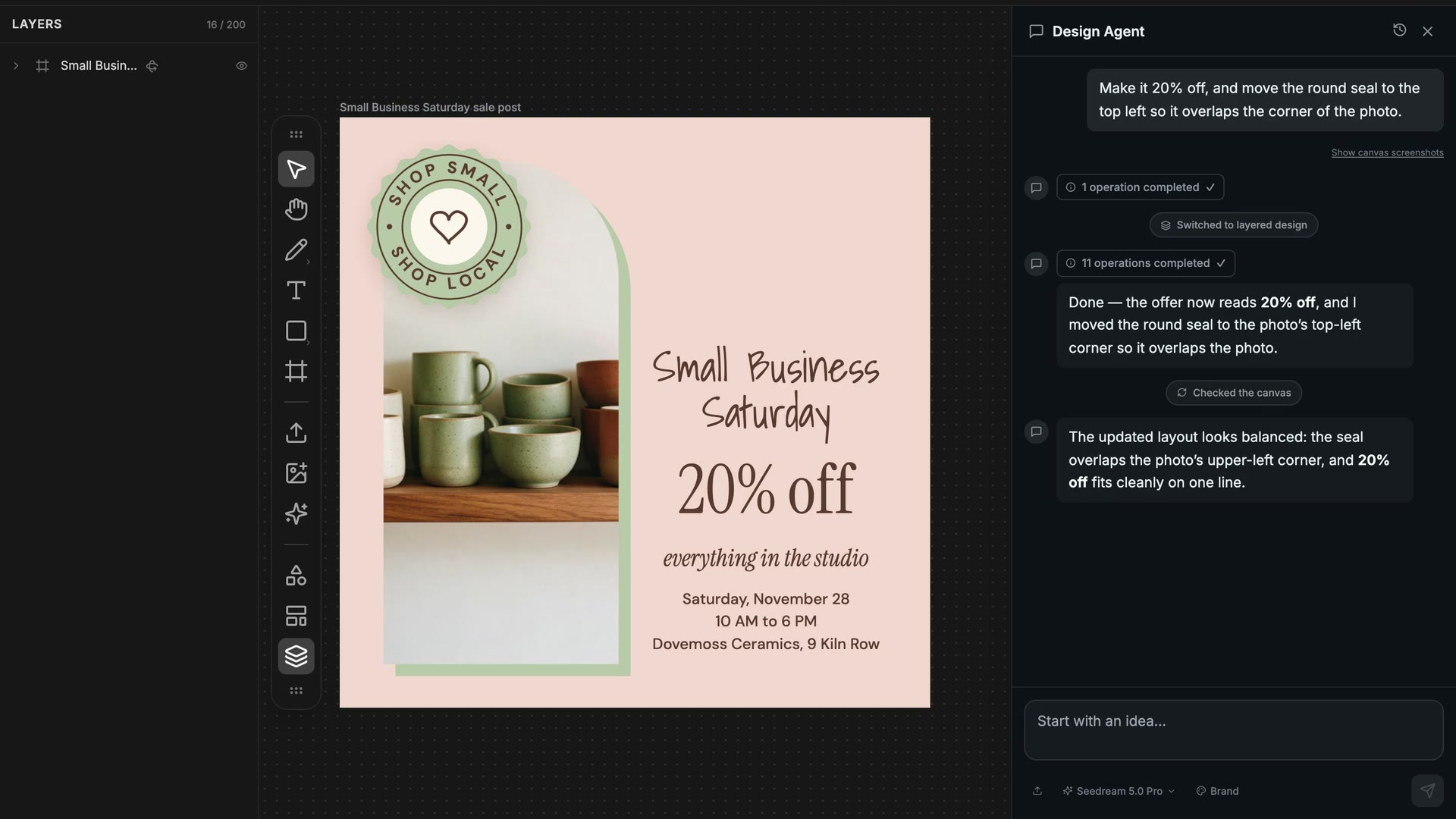
The chat is free on every plan, with a daily limit, and a text or layout edit costs nothing. You pay credits only when it makes or changes a picture (a new picture, a picture edit, background removal, upscaling or Decompose): 55 for a 1K picture on the default model, Seedream 5.0 Pro, or as little as 12 on FLUX 3 Klein. You can pick any of 11 image models, including Nano Banana Pro and GPT Image 2.5. You can also write an AI influencer's @handle in a brief to put a consistent character into a design.
Canva's AI is broad: Magic Design turns a prompt into templates, and Canva AI can generate editable designs. Editing an existing design by chat is listed for the Pro, Business and Enterprise plans, and every plan has a monthly cap on AI uses (20 on Free, up to 200 Premium uses on Pro).
A fair warning for both: AI designers make mistakes. Check the result, and ask again in plain words if something is off.
One canvas for a whole campaign
A BudgetPixel project is an infinite canvas. Each design is a frame, and frames of any size sit side by side: you see the post, the story and the cover together, and you can copy pieces between them. The AI designer sees the whole canvas too. After the edit above, we asked it for "a matching Instagram story next to this post", then "a matching Facebook event cover". It built both in under four minutes:
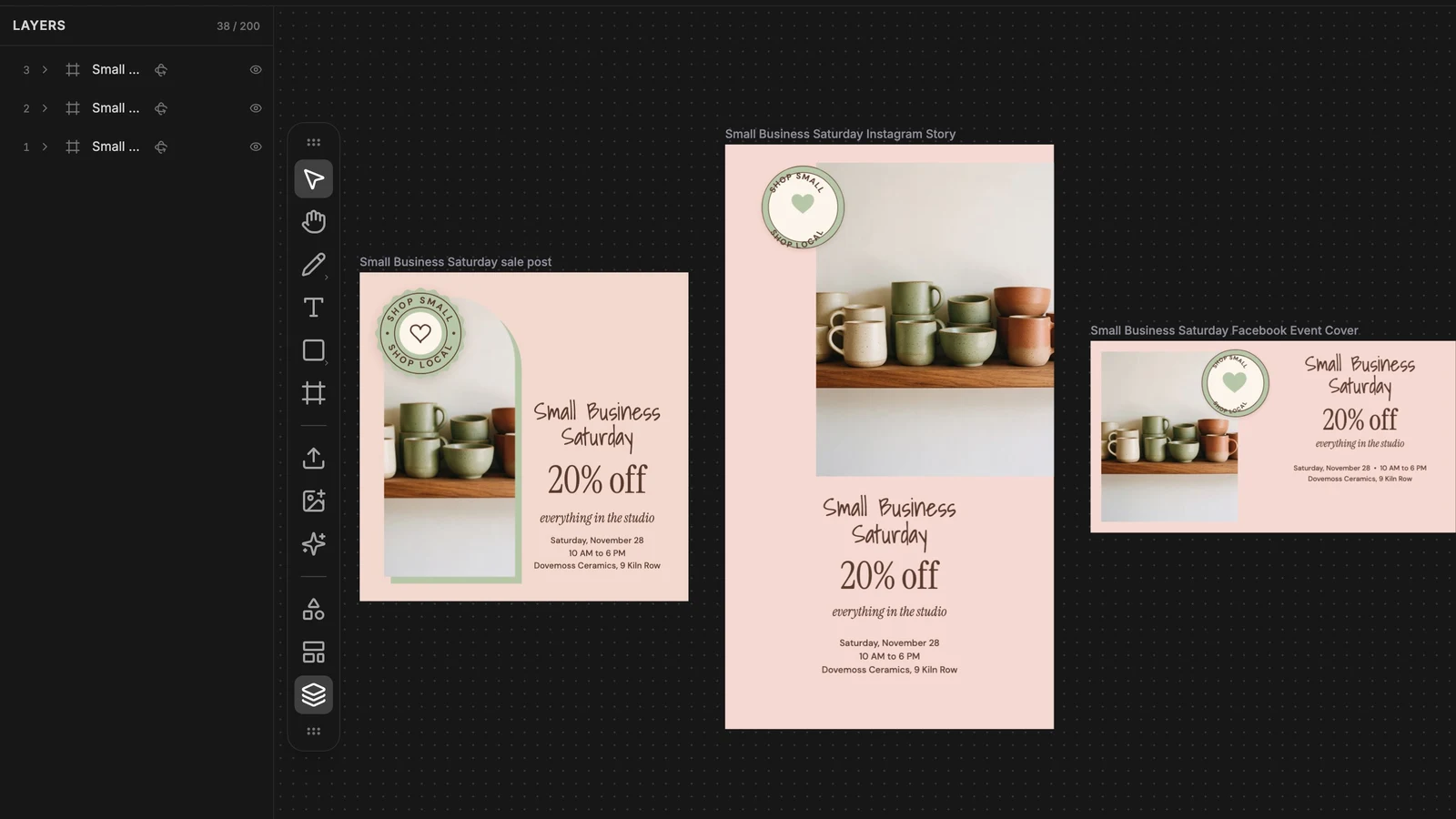
That's also BudgetPixel's answer to Canva's Magic Resize. It isn't one click, but the chat is free, and the designer lays out and checks each new size.
Canva organises a design as pages. Since 2025 a single Canva design can mix page types and sizes, Canva's Whiteboards are an infinite canvas, and you can embed other designs in a whiteboard. But we found no help article on editing several designs of different sizes side by side on one board, the way frames sit on a BudgetPixel canvas.
Layers you can actually see
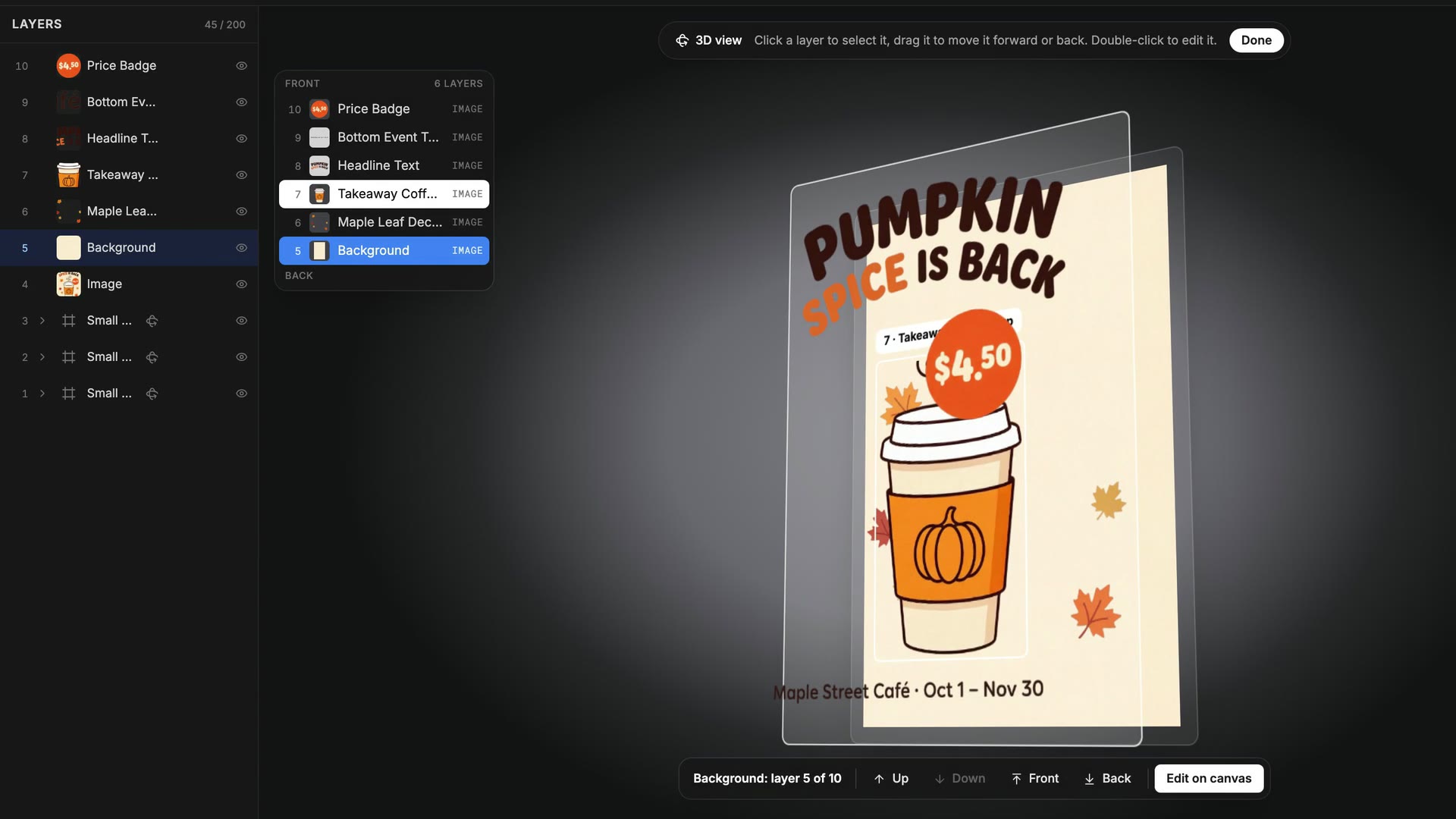
Canva has a layers panel (Position, then Layers). BudgetPixel numbers every layer, counting from the back, and adds a 3D view: open it on any frame and the design's layers stand apart in depth. Point at one to light it up, click to select it, and move it up or down the stack while you watch:
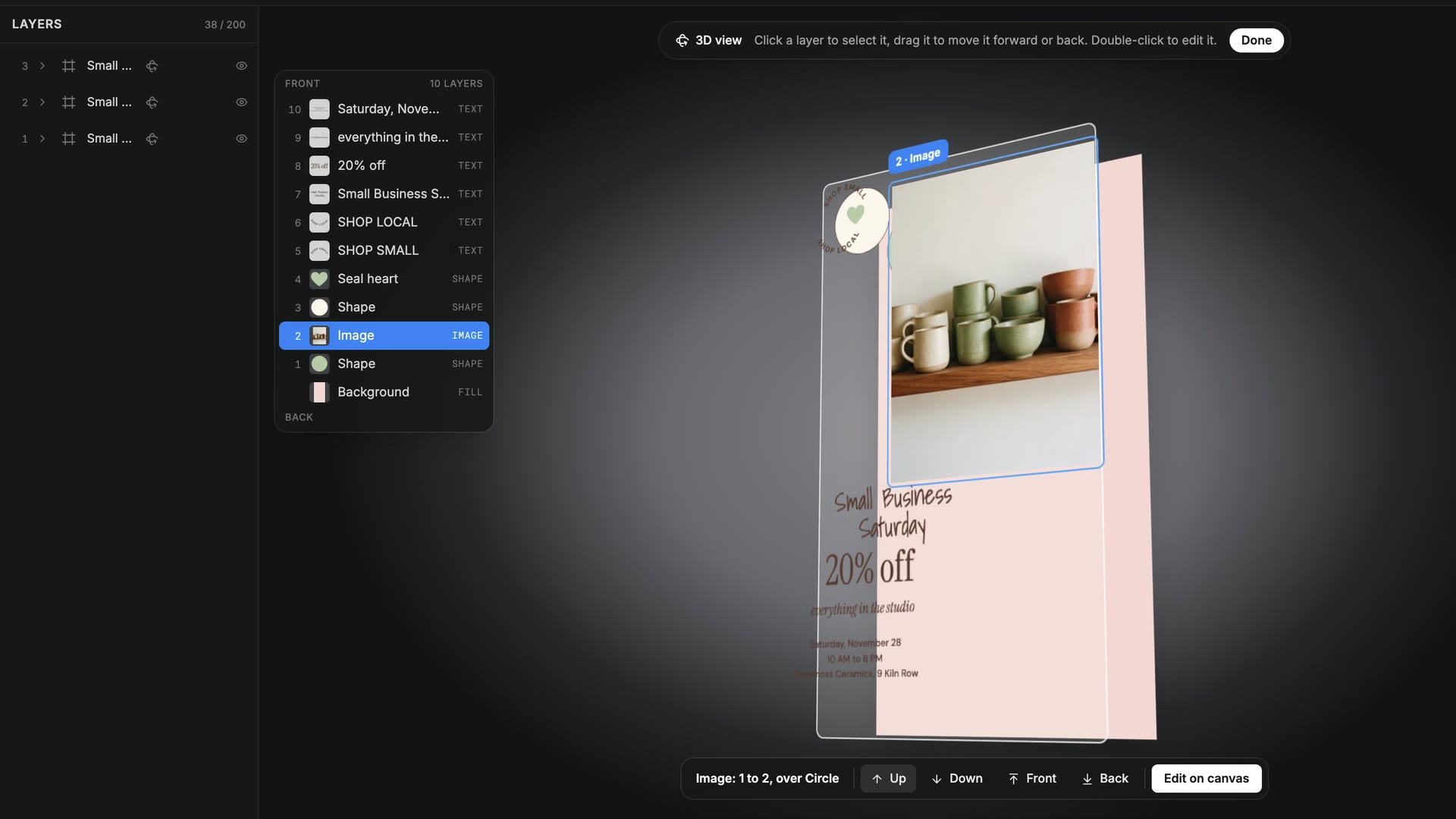
It sounds like a gimmick until you've lost a text box behind a photo. The 3D view also plays by itself when a template lands in the editor, so you know straight away which parts are editable. We found no 3D or exploded layer view in Canva's help center.
Turning a flat image into layers
Both tools can split a flat picture, like a PNG from an AI image generator, into separate layers. Canva's version is Magic Layers, launched in beta in March 2026; BudgetPixel's is Decompose, which returns a background and up to 8 transparent layers for 55 credits each. Canva's has one clear advantage: it restores text as live text boxes, while Decompose returns text as a picture that the AI designer can retype for you. We tested Decompose on an AI-made poster in Canva Magic Layers vs BudgetPixel Decompose.
What files can you download?
| BudgetPixel | Canva Free | |
|---|---|---|
| Pictures | PNG, JPG or WebP, full size | PNG, JPG |
| Transparent background | Yes, for cut-outs and other transparent layers | Paid plans |
| The AI designer puts frames on A4 or Letter pages, as pictures | PDF Standard and PDF Print | |
| SVG | No | Paid plans |
| Video and GIF | No | MP4 and GIF |
| Watermark | Never | Only on premium items you haven't paid for |
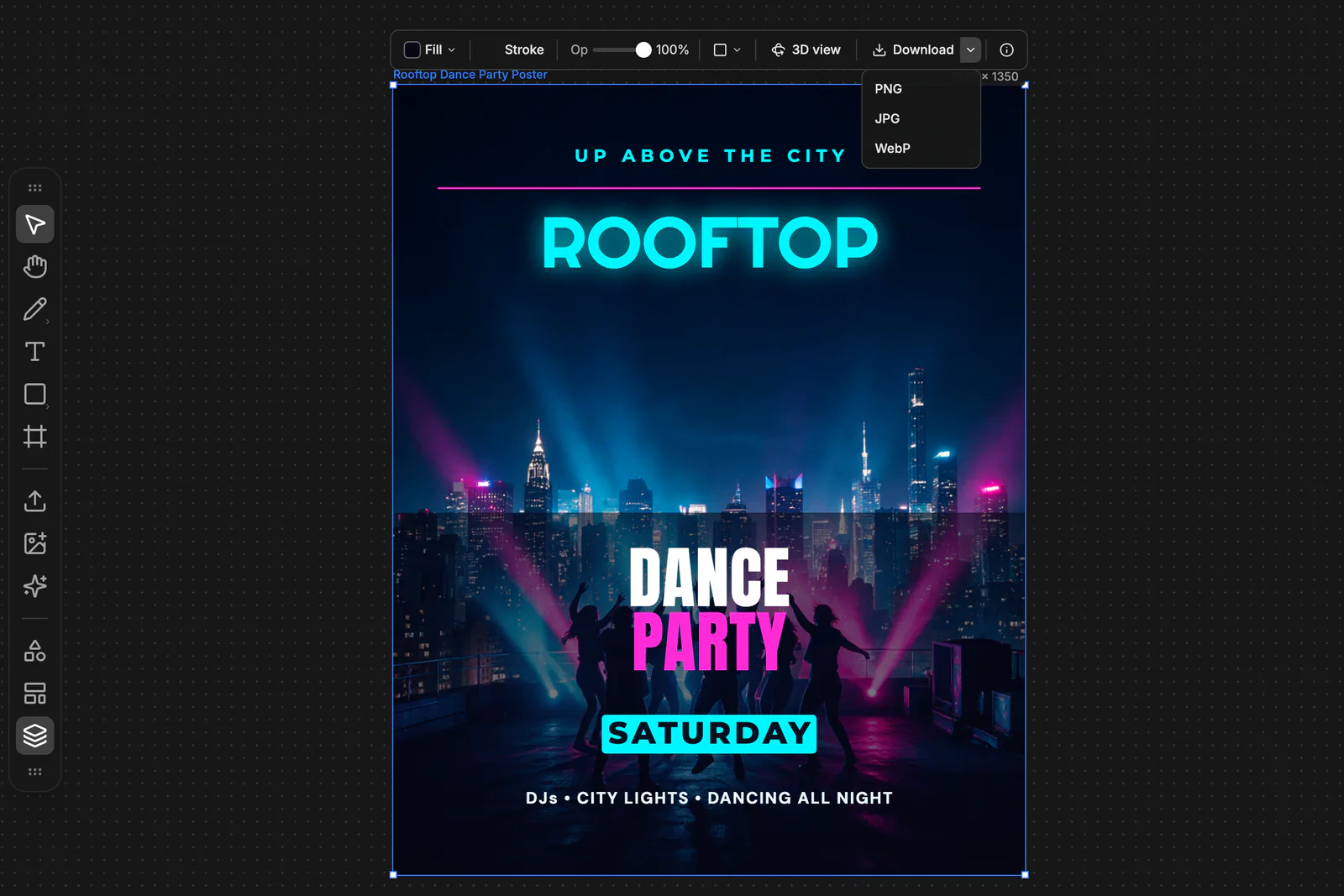
You can download a whole frame or only the layers you've selected. If you need print-ready PDFs with bleed, presentations or animated posts, Canva is the better tool today.
What do they cost?
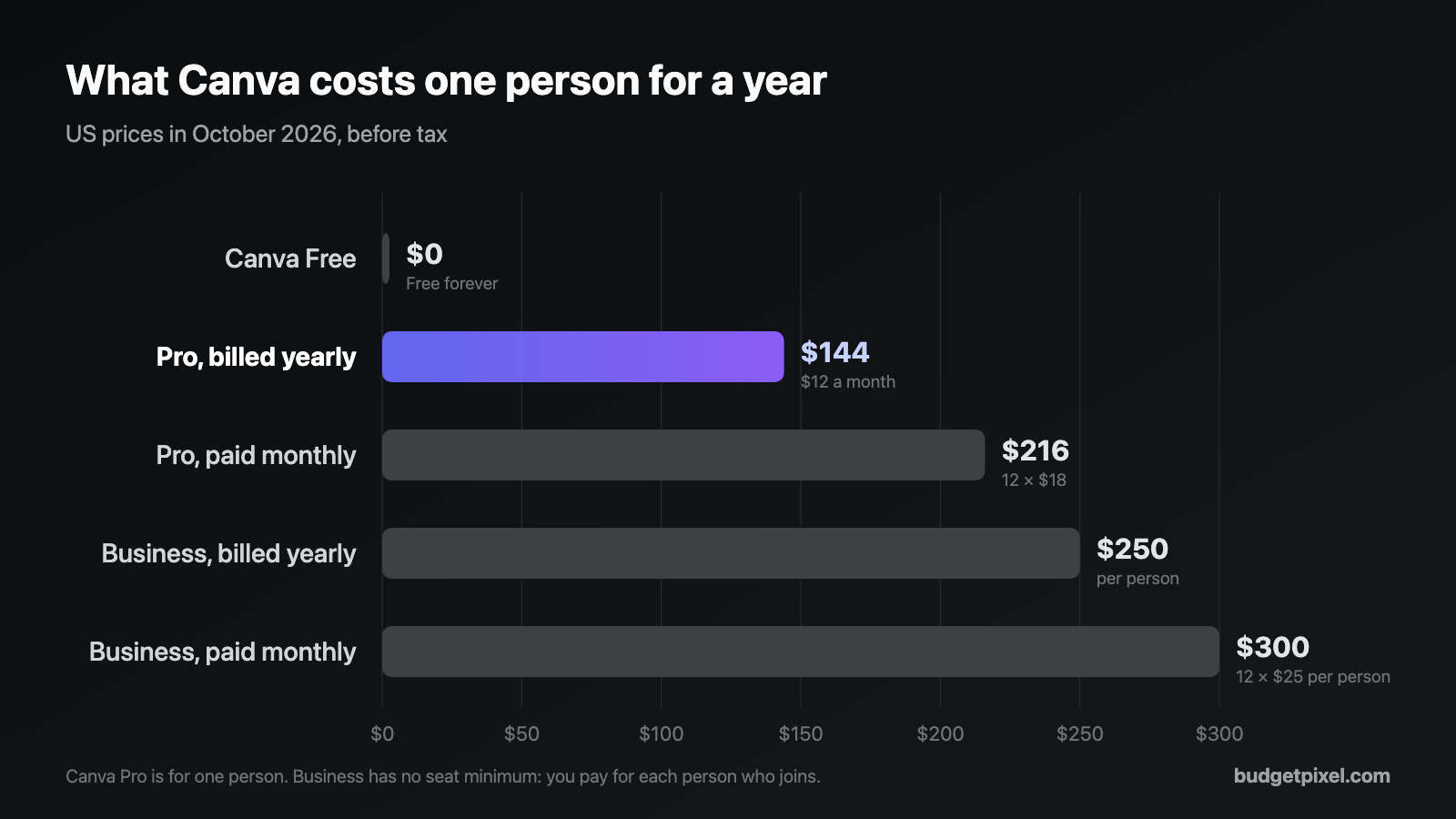
Canva: Free, then Pro at US$18 a month or US$144 a year for one person, and Business at US$25 a month or US$250 a year per person (US prices, October 2026). Our Canva Pro price guide has the full table and how the price has changed.
BudgetPixel: there's no design subscription. Templates, the editor and the AI designer's chat are free; credits pay for AI pictures and image tools. The free plan includes 300 credits a month, Basic is US$10 a month (11,000 credits), and a 10,000-credit pack costs US$10. A text or layout edit costs nothing; a new 1K picture on the default model costs 55 credits, about six cents. Designs made from templates can be used commercially on any plan; new AI pictures are for personal use on Free, limited commercial use on Basic, and full commercial use on Premium and up.
Where Canva is better
Canva is the better choice when you need:
- A huge library: millions of templates and 141 million+ premium photos, videos and graphics.
- More than graphics: video editing, presentations, documents, whiteboards, websites and Canva Print.
- Teamwork: real-time co-editing, comments, shared brand kits and team workspaces.
- Phones: full iOS and Android apps, and a limited offline mode.
- More file formats: print PDFs with bleed, MP4 and GIF, plus SVG on paid plans.
- One-click resizing with Magic Resize, and your own uploaded fonts.
Where BudgetPixel is better
BudgetPixel is the better choice when you want:
- Free, unlocked templates: no premium tier, commercial use allowed.
- A free AI designer that builds designs and edits the same layers you do, on every plan.
- A canvas for a whole campaign, with frames of any size side by side.
- To see your layers: numbered, and in 3D.
- A choice of image models, from Nano Banana Pro to GPT Image 2.5 and Seedream 5.0 Pro, and AI influencers you can cast by @handle.
- No subscription: pay for AI pictures as you use them, and use the same credits for AI video and music.
Which one should you use?
- Small business owner making a few posts and flyers a month: BudgetPixel's templates cover it for free, commercial use included; for AI pictures you'll use commercially, pick a paid plan.
- Creator making thumbnails and posts every week: BudgetPixel for AI-built designs, Canva if you also edit video in the same place.
- Teacher or student: Canva for Education is free for K-12; for quick graphics, both work.
- Marketing team: Canva Business, for shared brand kits and real-time collaboration.
- Anyone who wants AI to do the layout: BudgetPixel's designer, because its chat is free and it edits layers directly.
How to try BudgetPixel in five minutes
- Open budgetpixel.com/design on a computer and sign in.
- Pick a template, or write a brief in the chat, such as "a poster for a bake sale on Saturday".
- Ask for changes in plain words, or click any layer and edit it yourself.
- Need another size? Ask for "a matching Instagram story next to this".
- Download as PNG, JPG or WebP. No watermark, no subscription.
How we tested
- When: October 26, 2026, on BudgetPixel's live Design Studio code, with a free template and real AI designer requests. Timings are from our runs and vary with the request.
- Canva: features and prices come from Canva's own pricing, help and newsroom pages, checked the same week. We didn't test inside a Canva account.
Sources
- Canva: pricing, AI access and limits, Canva AI design assistant, Whiteboards, download file types, premium elements, Magic Layers, content license
- BudgetPixel: Design Studio, templates, license, pricing
Questions people ask
Is BudgetPixel a free alternative to Canva?
For graphic design, yes. Design Studio's 2,000+ templates are all free for personal and commercial use, downloads carry no watermark, and the AI designer's chat is free on every plan with a daily limit. Credits pay only for AI pictures and image tools; the free plan includes 300 a month. Designs made from templates can be used commercially on any plan; AI pictures need a paid plan for commercial use.
Is BudgetPixel better than Canva?
It's better at some things and worse at others. BudgetPixel is stronger at AI design: a free AI designer that edits real layers, a choice of 11 image models, Decompose and a 3D view of every layer. Canva is stronger at breadth: millions of templates, video, presentations, print, mobile apps and team collaboration.
Can I import my Canva designs into BudgetPixel?
Not as editable Canva files. Download the design from Canva as a PNG or JPG and use Decompose to split it into layers, or give the picture or a PDF to the AI designer as a reference and ask it to rebuild the design.
Does BudgetPixel have an infinite canvas?
Yes. A Design Studio project is one canvas that holds frames of any size side by side, such as a post, a story and an event cover for the same campaign, and the AI designer can work across all of them.
Can the AI edit a design I already made?
Yes. Ask in plain words, such as 'make it 20% off and move the seal over the photo', and the designer changes those layers in place. On Canva, editing a design by chat with Canva AI is listed for the Pro, Business and Enterprise plans.
Does Canva have a layers panel?
Yes, under Position, then Layers. What BudgetPixel adds is numbered layers and a 3D view that spreads a design's layers apart so you can see and reorder them; we found no equivalent in Canva's help center.
Can I use BudgetPixel on my phone?
You can browse templates on a phone, but editing needs a computer with a mouse or trackpad. Canva has full iOS and Android apps.
Does BudgetPixel support team collaboration?
Not yet: there are no shared team workspaces or real-time co-editing. If several people edit the same designs every day, Canva Business is the better fit.
See for yourself
Free templates and a free AI designer chat. AI pictures cost credits, from 12.