How to Face Swap a Photo or Video With AI
To face swap a photo with AI, upload a clear photo of the face you want to use and the photo you want to put it in. The AI blends the face in, matching the light and the angle, and usually the skin tone. On BudgetPixel's Face Swap that takes about 25 seconds and 30 credits, with no watermark, and Swap Head brings the hair and beard along too. For video, Recast replaces the whole person. Only swap faces you have permission to use.
 By BudgetPixel Team9 min readFacts verified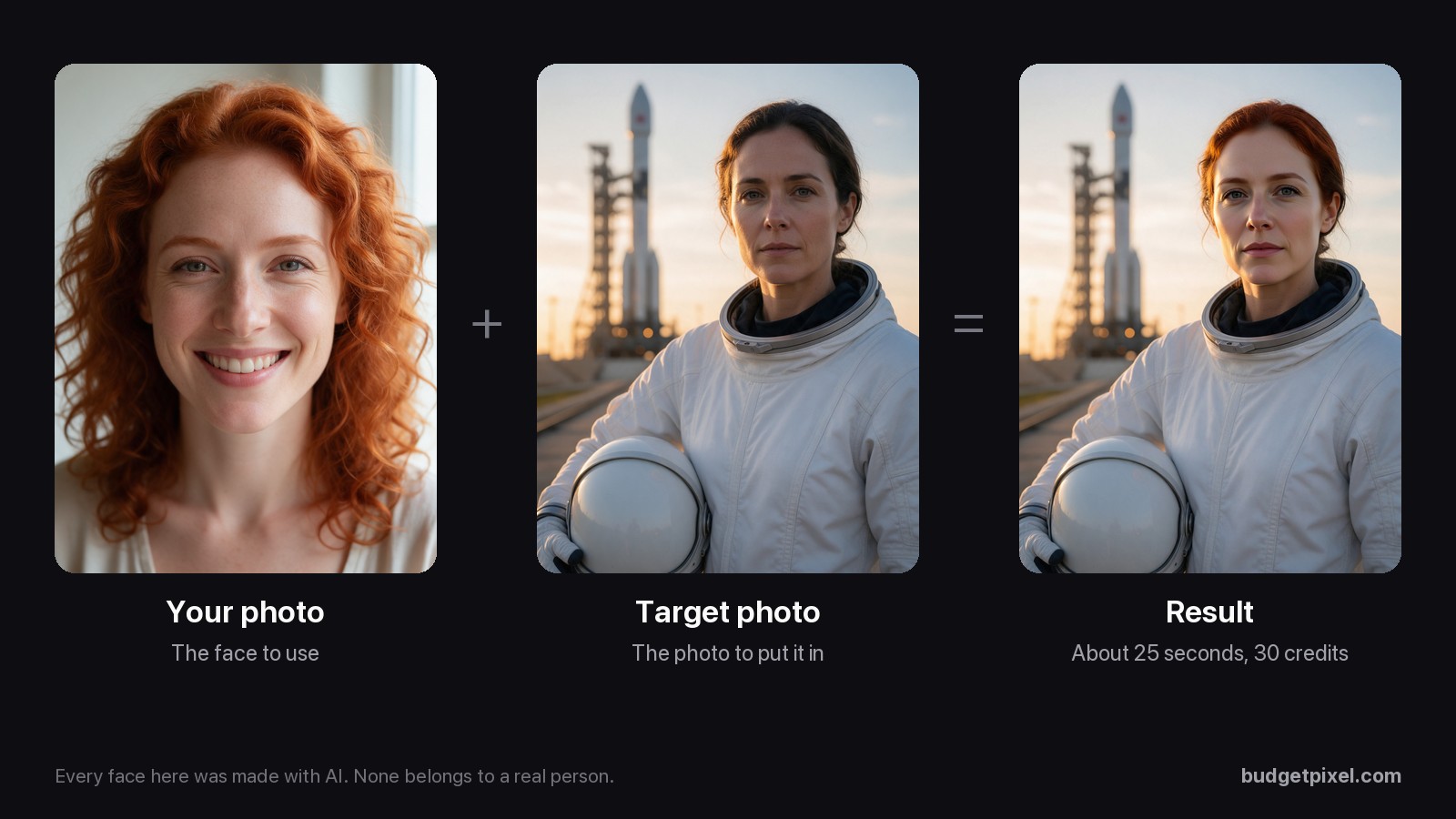
On this page
To face swap a photo with AI, you need two pictures: a clear photo of the face you want to use, and the photo you want to put it in. The AI takes the face from the first and blends it into the second, matching the light and the angle, and usually the skin tone. On BudgetPixel's Face Swap, that takes about 25 seconds and costs 30 credits.
This guide shows the steps, what changes when you swap a whole head instead, how to get a result that looks real, what to do for video, and the rules that keep it fun rather than harmful. Every face in our photo examples was made with AI, so none of them belongs to a real person.
What is an AI face swap?
An AI face swap replaces the face in one photo with the face from another, and keeps everything else: the body, the clothes, the pose, the background and the light. Good tools don't paste the face on top. They redraw it so it fits the new photo: the same angle as the face they replace, the same lighting and, usually, a matching skin tone.
There are two kinds:
- Face swap changes the face only. The target keeps its hairstyle, so the result looks like your face with someone else's haircut, though the hair color can shift toward yours.
- Head swap changes the whole head, hair and beard included. It's closer to "you, in that photo".
How do you face swap a photo with AI?
On BudgetPixel, it's two uploads and one button:
- Open Face Swap and sign in. It works on every plan, including Free.
- Under Your Photo, add the face you want to use: upload it, drag it in, or pick it From Assets.
- Under Target Image, add the photo you want to put the face in.
- Leave Swap Head off for a face swap, or turn it on to replace the whole head.
- Press Face Swap (30 credits). The button says Head Swap when Swap Head is on.
The result appears in the Result panel in about 25 seconds and is added to Recent Results. It's saved privately to your assets, in the folder picked under Save to Folder. Download it as a PNG; there is no watermark. If something goes wrong, you aren't charged.
The swap at the top of this page used a close-up of a smiling woman as Your Photo and an astronaut on a launch pad as the Target Image. Notice that the result kept the astronaut's calm expression, not the smile: the expression, pose and light come from the target photo. So pick a target with the expression you want.
Face swap or head swap: which should you use?
Use a face swap when you want to keep the target's hairstyle, costume or look, and a head swap when the result should look as much like you as possible.
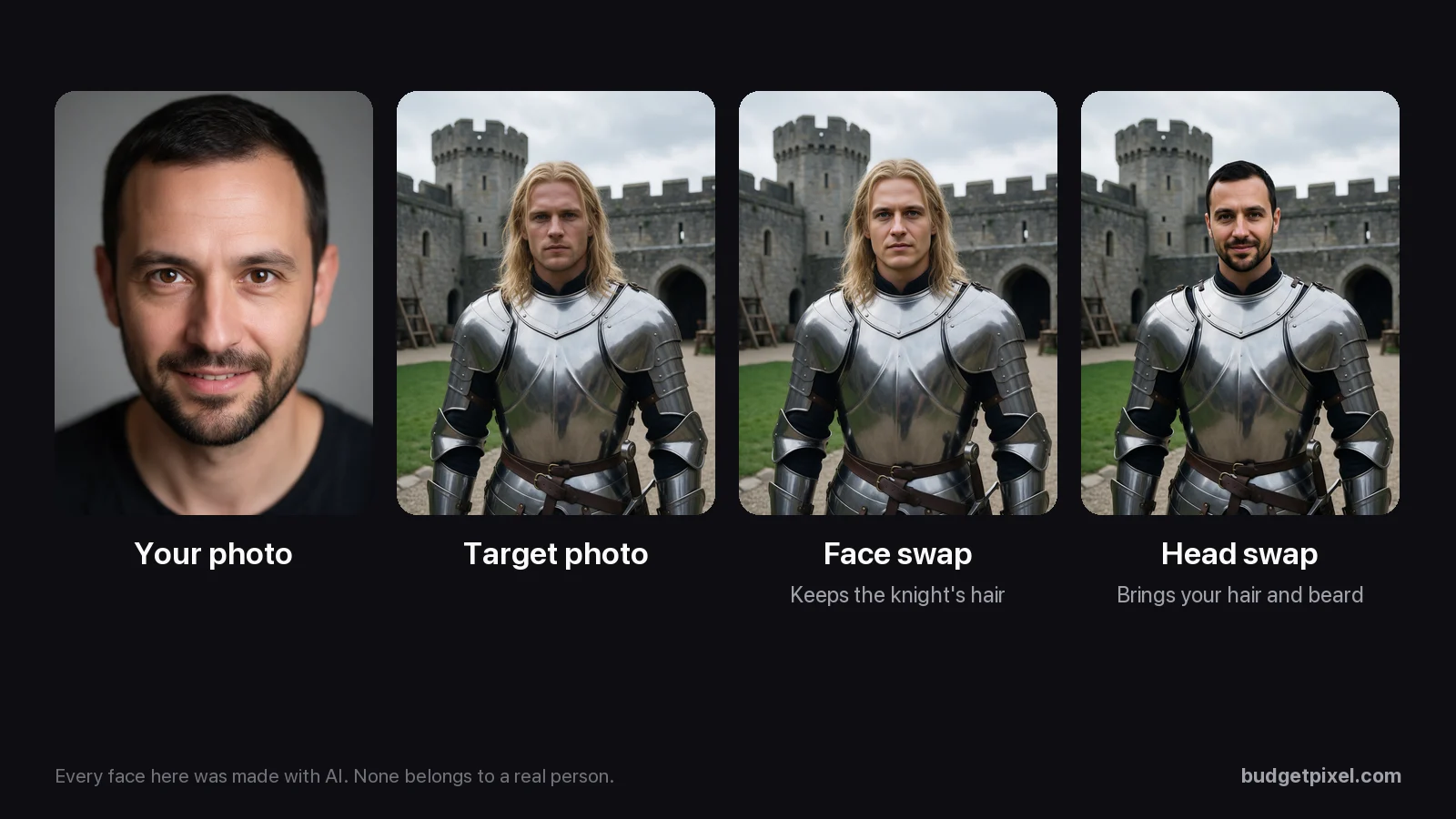
We tried both on the same pair. The face swap kept the knight's long blond hair and left out the man's beard. The head swap brought his short dark hair and his beard, and it's the one that looks like him. Both cost the same 30 credits.
The tool's own tip for head swaps is worth following: use two photos of the same shape, for example two portrait photos.
How do you make a face swap look real?
Most bad swaps come from photos that don't match. Before you press the button:
- Use a sharp photo of the face, looking at the camera, in even light, with nothing in the way: no sunglasses, no hand, no hair over the eyes.
- Match the angle. A face looking straight ahead fits a target that looks straight ahead. A profile onto a front view rarely works.
- Pick a target where the face is big. A face that fills a good part of the photo gives the AI more to work with than a tiny face in a crowd.
- Choose the expression in the target, since a face swap keeps it.
- Use Swap Head when hair or a beard is part of the look.
- Crop group photos first. Face Swap is made for one face, and you can't pick which one it changes.
- Use JPG or PNG files. iPhone HEIC photos may fail; a failed swap isn't charged.
One more thing we found: in our test, a black-and-white target came back with the face in color.
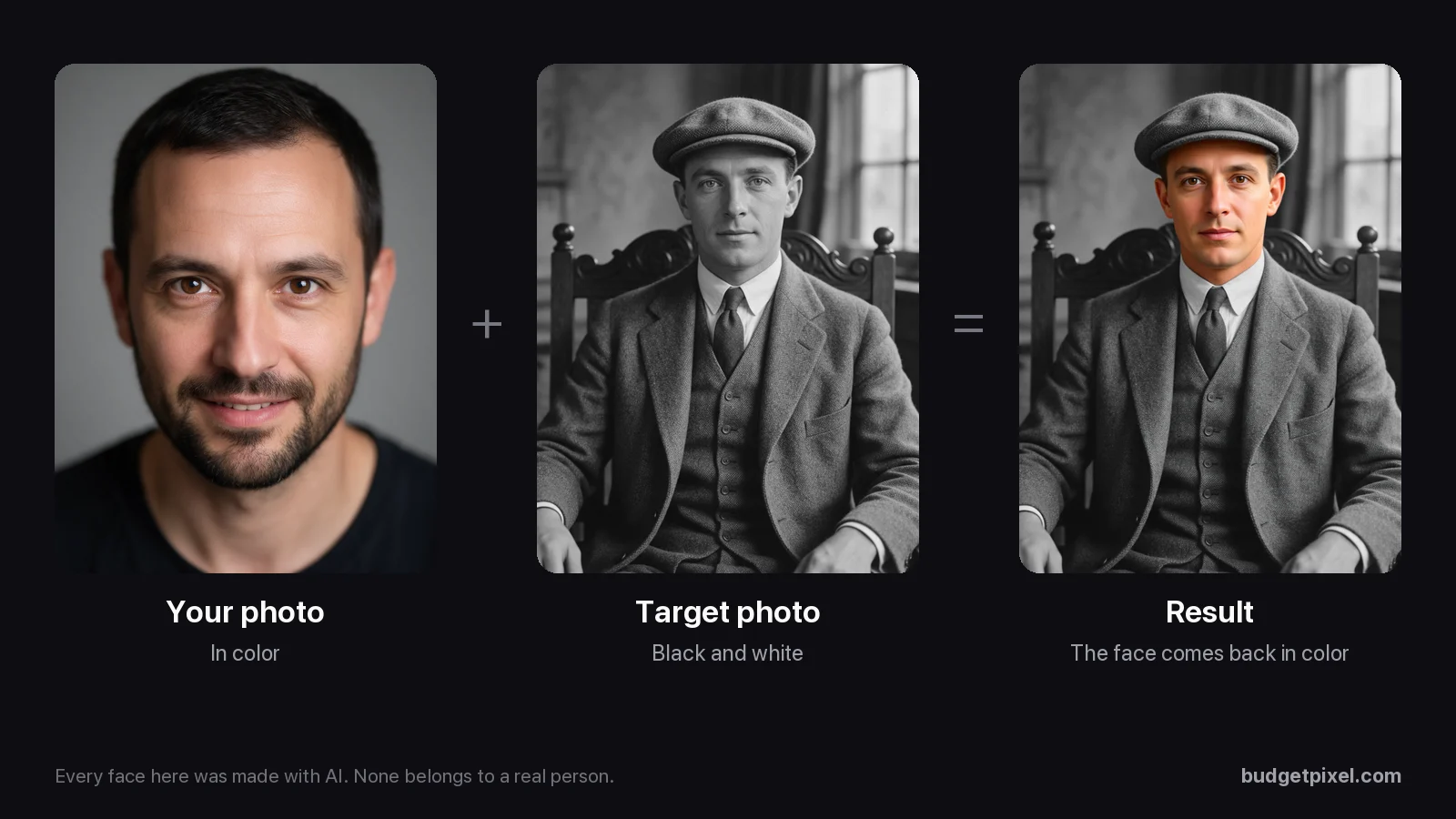
The face kept the color of the photo it came from, so it arrived in color while the suit and chair stayed gray. If you want the old-photo look, turn the result black and white in any photo editor afterward.
Can you face swap a video?
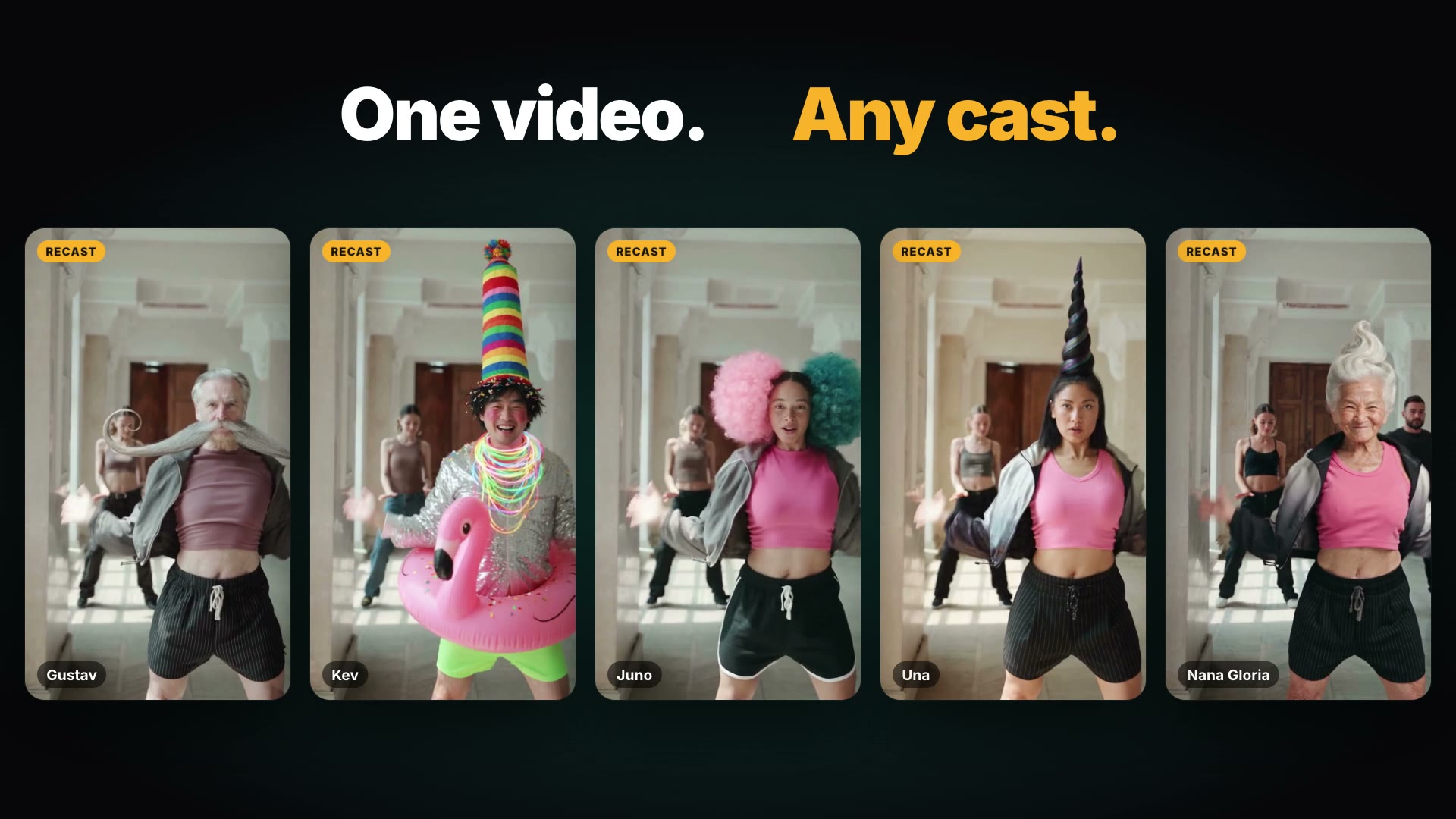
Yes, but on BudgetPixel you swap the whole person, not just the face. Recast takes a clip, keeps the moves, the camera and the timing, and replaces the people you pick with a character you choose:
A few things to know about Recast:
- It recasts 4 to 30 seconds of a clip (up to 15 seconds on the lower-cost models), with up to 4 characters in one recast.
- The cast can be you. Upload a person's photo and Recast asks you to confirm: "This is me, or I have this person's permission to use their photo." You can also use one of BudgetPixel's AI influencers, or a character you made.
- It's priced per second, from about 117 credits a second on Seedance 2.0 Mini at 480p before any plan discount, and you're charged only when your recast is ready.
There's no face-only video swap on BudgetPixel, and no GIF face swap. If you only need the face changed in a clip, some sites with a dedicated video face-swap tool do that, including Magic Hour and Remaker (as of October 2026). The Recast guide covers the full Recast workflow, and the dance-trend guide shows it on a real trend.
How much does a face swap cost?
A face swap or head swap costs 30 credits on every plan, which is about $0.03 in a credit pack ($1 per 1,000 credits).
- On the Free plan, the 300 monthly credits cover 10 swaps, and checking in daily adds 20 to 60 credits a day.
- Nothing is charged if a swap fails or is blocked by a safety check.
- No watermark, and results are private to your account until you share them.
What you may do with the result depends on your plan: swaps made on the Free plan are for personal, non-commercial use, the Basic plan allows limited commercial use, and Premium and up allow full commercial use. Whatever your plan, using a real person's face to promote something needs that person's consent.
Is face swapping legal?
Swapping your own face, or a friend's with their permission, into a photo for fun is generally fine. The trouble starts with consent, sex and money. As of October 2026:
- In the US, the TAKE IT DOWN Act, signed on May 19, 2025, makes it a federal crime to knowingly post intimate images of a recognizable person online without their consent, AI-made fakes included, when the post is meant to cause harm or does (the rules for minors are stricter). Since May 19, 2026, sites and apps that host user posts must remove a reported image within 48 hours of a valid request.
- Also in the US, state right-of-publicity laws, such as California Civil Code §3344 and New York Civil Rights Law §§50-51, bar using someone's name or likeness to sell something without their consent.
- In England and Wales, sharing a sexual deepfake of someone without their consent has been a crime since January 31, 2024, and since February 6, 2026, so is making one, or asking someone else to make one. Scotland and Northern Ireland have their own laws.
- In the EU, since August 2, 2026, the AI Act has required businesses and others who use AI professionally to make clear when an image or video is a deepfake; purely personal use isn't covered, and obvious satire or fiction only needs a light label.
- On social media, YouTube requires creators to disclose realistic AI-made or altered content, TikTok requires a label on AI content that shows realistic-looking people or scenes, and Meta requires a label on photorealistic AI video and realistic-sounding audio, though not on still images. TikTok also doesn't allow AI content showing the likeness of anyone under 18, or of a private adult without their permission, even with a label.
This isn't legal advice. If a swap is for a business, an ad or anything public involving someone else's face, get their written permission first.
What won't BudgetPixel let you do?
BudgetPixel's Terms of Service forbid content that shows real people without their consent, and anything that sexualizes minors. Before a swap runs, both photos go through safety checks:
- Every swap is checked for sexual content involving minors, on every account, and suspected child sexual abuse material is preserved and reported to the National Center for Missing & Exploited Children.
- Nude or sexually explicit swaps of public figures are blocked, on every account.
- A blocked request costs nothing.
Checks catch a lot, but they're not the whole answer: the rules apply to every swap, whether or not a check flags it. Leave children out of face swaps you share, and don't swap anyone who hasn't said yes.
Which face swap tool should you use?
For photos, pick a tool that gives you a clean result without a watermark and keeps your photos private. BudgetPixel's Face Swap does both, offers face or head mode, and costs 30 credits a swap. It also sits next to the tools you'll want afterward: an image editor, upscaling, and characters for keeping the same face across many pictures and videos.
Its limits are worth knowing too: it's made for one face at a time, needs a sign-in, and doesn't do face-only video swaps. If you need several faces swapped at once, or just the face changed in a video, another tool may suit that job better.
Sources
- Our test swaps: four swaps made on BudgetPixel on October 28, 2026, from faces and photos made with AI.
- Times and prices: BudgetPixel's Face Swap and all face swaps by members in the 30 days to October 28, 2026; pricing.
- Rules: BudgetPixel Terms of Service (updated October 27, 2026).
- Law: TAKE IT DOWN Act, Public Law 119-12 (2025); California Civil Code §3344; New York Civil Rights Law §§50-51; Sexual Offences Act 2003 ss.66B and 66E–66F (England and Wales); Data (Use and Access) Act 2025, s.138; EU AI Act, Article 50.
- Platforms: YouTube Help, "Disclosing use of GenAI content"; TikTok Community Guidelines and Safety Center; Meta Help Center, "How to identify AI content on Meta products".
Questions people ask
How do I face swap a photo for free?
Sign up for BudgetPixel's Free plan, which gets 300 credits a month, plus 20 to 60 credits a day for checking in. A face swap costs 30 credits, so the monthly credits alone cover 10 swaps, with no watermark. Swaps made on the Free plan are for personal, non-commercial use.
How do I face swap a video?
BudgetPixel doesn't swap only the face in a video. Recast replaces the whole person in a clip with a character you choose, keeping their moves and the camera. If you upload a real person's photo, you have to confirm it's you or that you have their permission. Recast is priced per second of video and charges only when the recast is ready.
What is the difference between a face swap and a head swap?
A face swap moves the face onto the target photo but keeps the target's hairstyle and leaves a beard behind: in our tests, a bearded face came out clean-shaven. A head swap brings the whole head, with hair and beard. In our test, the head swap was the one that looked most like the person in the photo we used.
Why does my face swap look fake?
Usually because the two photos don't match: a face turned sideways going onto a face looking at the camera, harsh light against soft light, or a face covered by sunglasses, hair or a hand. Use a sharp, front-facing photo, pick a target where the face is big and turned the same way, and try Swap Head if hair or a beard matters.
Is face swapping legal?
Swapping your own face, or a friend's with their permission, for fun is generally fine. Posting a sexual deepfake of someone without their consent can be a federal crime in the US, and in England and Wales even making one is. Using someone's face to sell something needs their consent under right-of-publicity laws. This isn't legal advice.
Can I face swap a celebrity?
Don't. BudgetPixel's Terms forbid content showing real people without their consent, and using a famous face in an ad or endorsement can break right-of-publicity laws. BudgetPixel also blocks nude or sexually explicit swaps of public figures before anything is made.
Does BudgetPixel's face swap add a watermark?
No. The result is a PNG with no watermark, saved privately to your BudgetPixel assets. Nobody else sees it unless you share it.
How long does a face swap take?
About 25 seconds. That is the middle time over all face swaps on BudgetPixel in the 30 days to October 28, 2026; at busy times one can take a minute or more.
Can I swap more than one face in a photo?
BudgetPixel's Face Swap is made for one face, and you can't pick which face it changes in a group photo. Crop the target photo to the one person you want, then swap.
Try it yourself
30 credits a swap. Results are private to your account, with no watermark, and a swap that fails or is blocked costs nothing.