Consistent Characters in AI: How to Keep the Same Face in Every Image and Video
A written description keeps a character's clothes, not her face. We tested what does keep an AI character consistent, with one of our AI influencers in four scenes, seven image models, a two-character shot and three video models, and show how to do it on BudgetPixel.
 By BudgetPixel Team14 min readFacts verified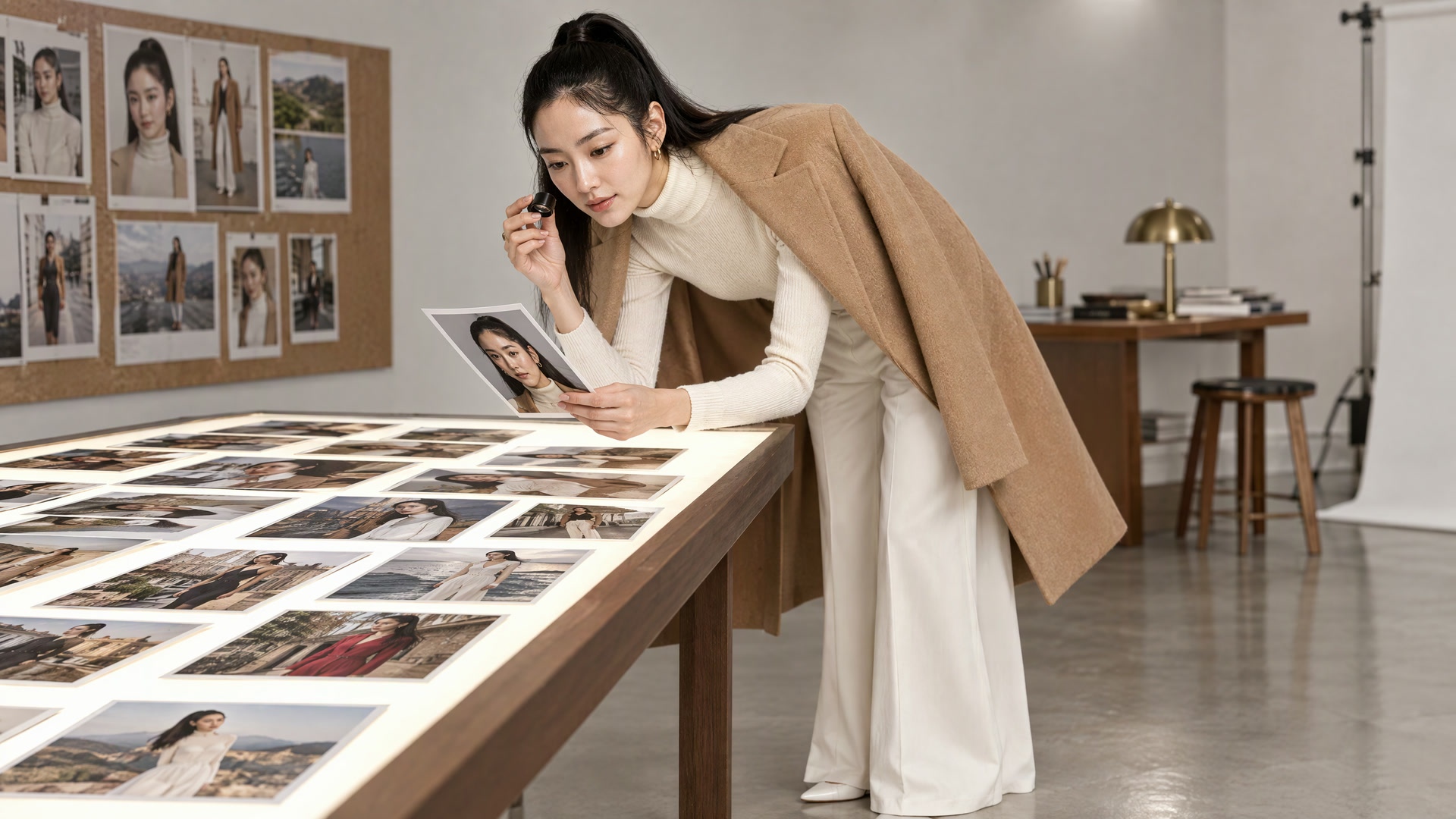
On this page
Ask an image model for "a Korean fashion model with a sleek high ponytail, a cream turtleneck and a camel coat" four times, in four places, and you get four women in a camel coat. The coat is consistent. The face isn't.
That is the whole problem with AI characters. A model draws a new person every time it starts a picture, and words describe a type of person, not one person. To see what actually keeps a character the same, we took Stella, one of our AI influencers, through four scenes, seven image models, a two-character shot and three video models, one take each, in October 2026.
The short answer
Give the model a picture of the character, not just a description. A good reference picture carries what words can't: the shape of a jaw, the set of the eyes, the hairline, the exact gold hoops. The prompt then only has to say where she is and what she's doing.
On BudgetPixel that is one word. Type @stella in a prompt, or the handle of any character you made or collected, and the model gets her picture and her written look together. It works on 21 image models and 11 video models, and it costs nothing extra: you pay the model's usual price.
Why AI characters drift
An image model has no memory of the last picture it made. Each new picture starts from random noise and is shaped by the prompt, so two pictures from similar prompts share only what the words pin down. "High ponytail" and "camel coat" pin down a lot. "Korean, late twenties" fits millions of faces, and the model picks a new one every time.
Fixing the seed, the number that sets that starting noise, helps only while the prompt stays the same. Change the scene from a café to a train and the composition changes, and the face changes with it.
In our tests the face was always the first thing to drift: the jaw, the eyes, the nose, the apparent age. Unusual proportions came next. Clothes, accessories and hair colour held best, because they are easy to name.
Test 1: the same words vs a cast
We gave GPT Image 2.5 Sunburst four scenes: ordering coffee at a café counter, crossing a wet street under a clear umbrella, sitting by a train window, and laughing at a rooftop party. Each scene ran twice at 1K, asking for a medium close-up from the chest up:
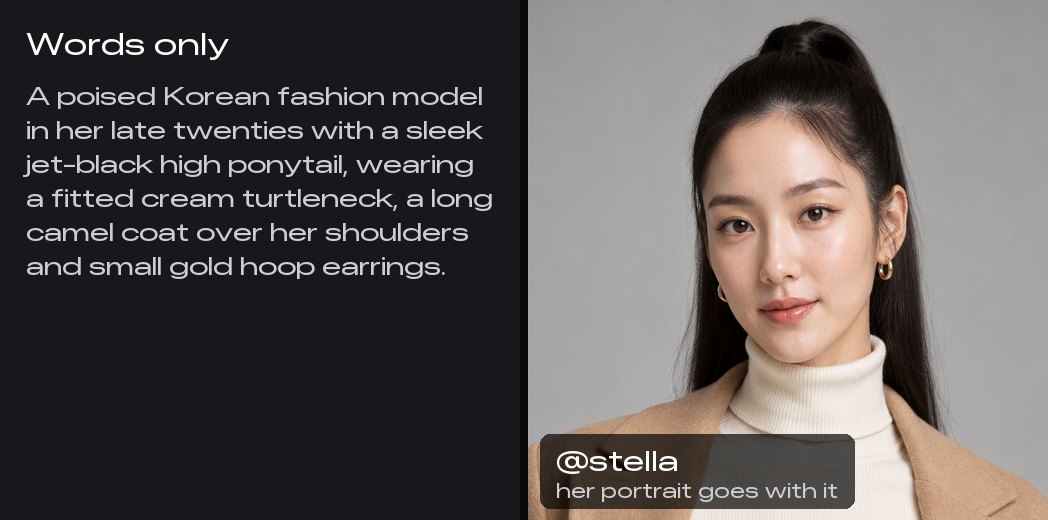
- Words only: her look from her character record, trimmed to what a chest-up picture shows: "A poised Korean fashion model in her late twenties with a sleek jet-black high ponytail, wearing a fitted cream turtleneck, a long camel coat over her shoulders and small gold hoop earrings."
- Cast:
@stellaand the same scene, nothing else.
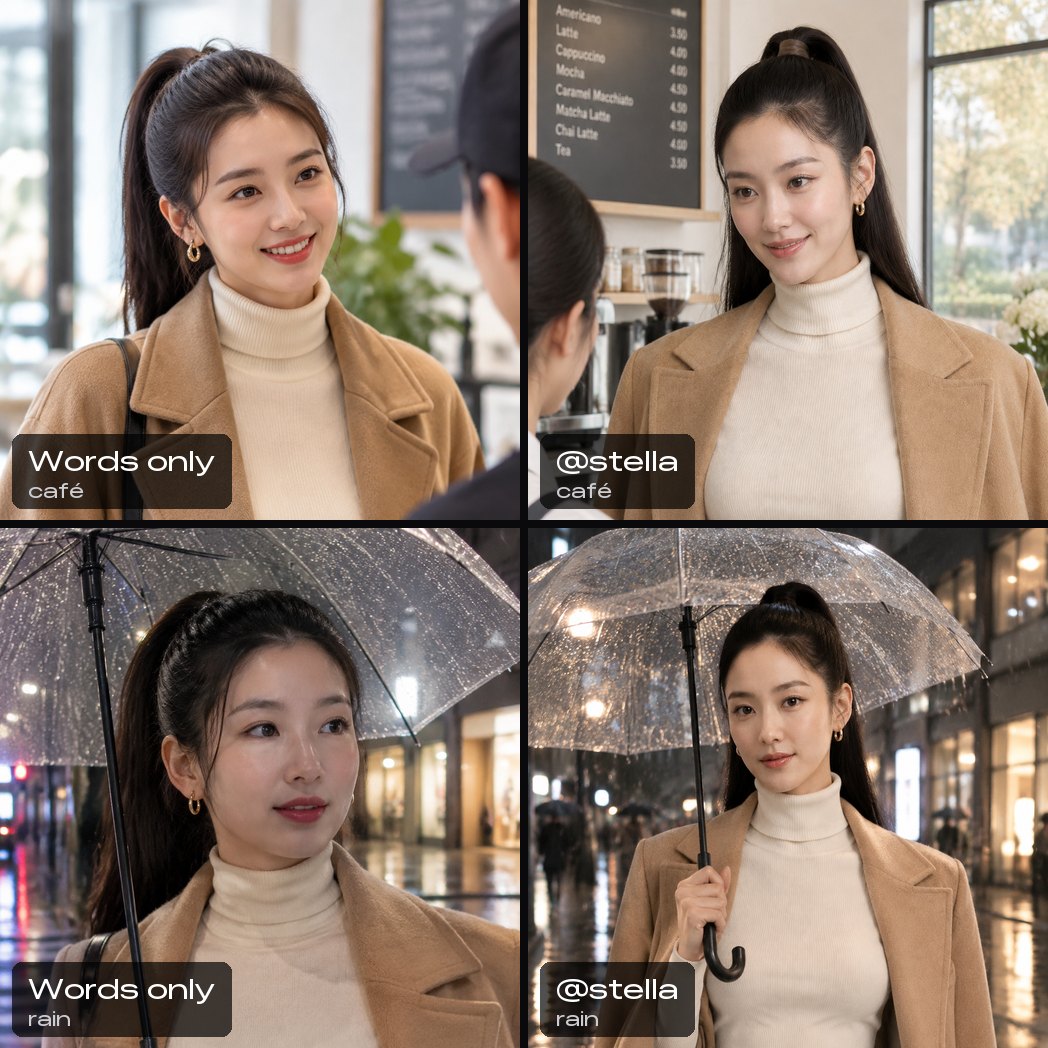
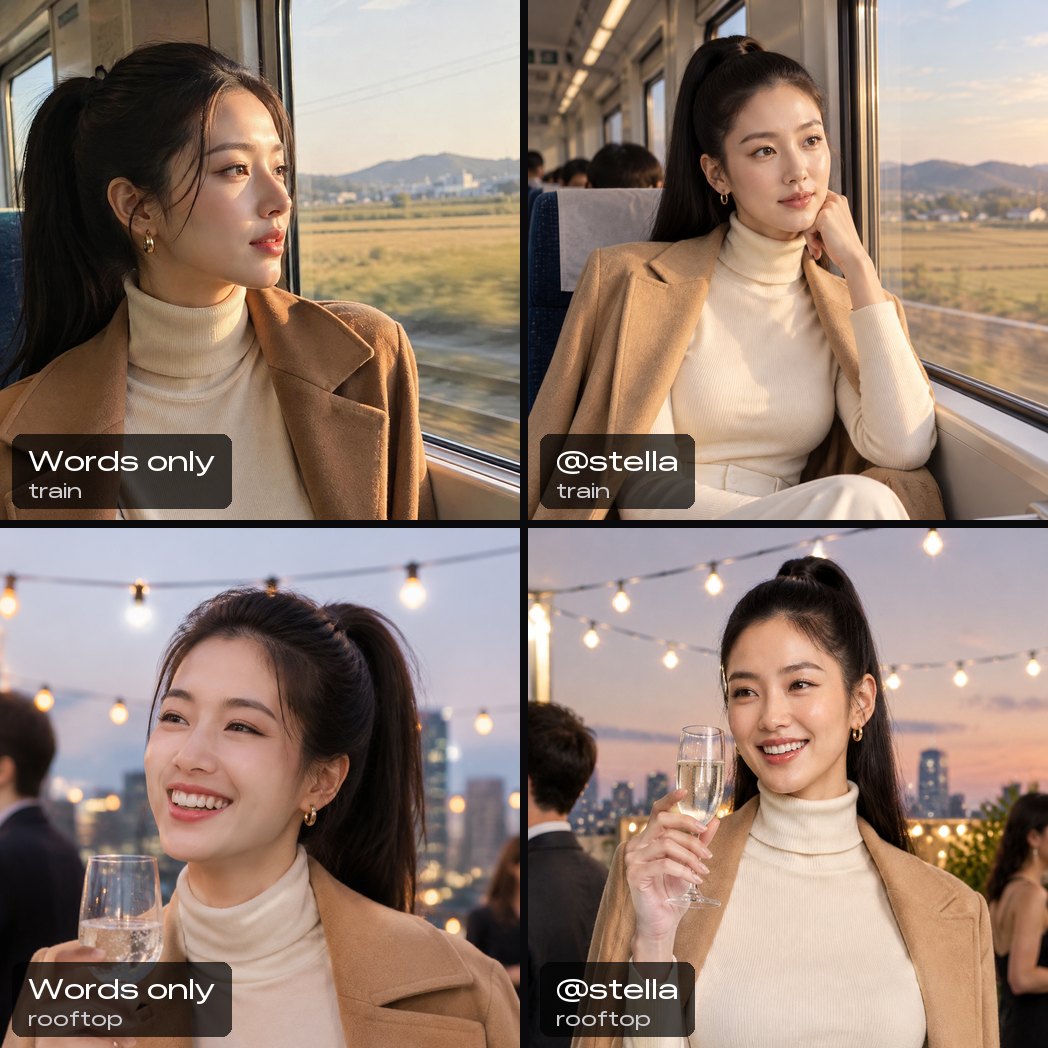
The words got everything they named: the turtleneck, the camel coat, the hoops and the ponytail are in all four. They didn't get her. The café woman has a rounder face, the woman under the umbrella looks younger, and the rooftop smile belongs to someone else.
The cast got the same woman four times, and the same woman as her reference portrait. It cost the same, too: 40 credits a picture with or without the cast.
One more thing showed up on the way. An earlier run of the words-only prompt used her full look, which includes her signature detail, "absurdly long legs, about twice the normal length". The model drew her full length in three of the four scenes, even though the prompt asked for a close-up. A striking detail in a description can override the framing you ask for.
Test 2: one cast, seven image models
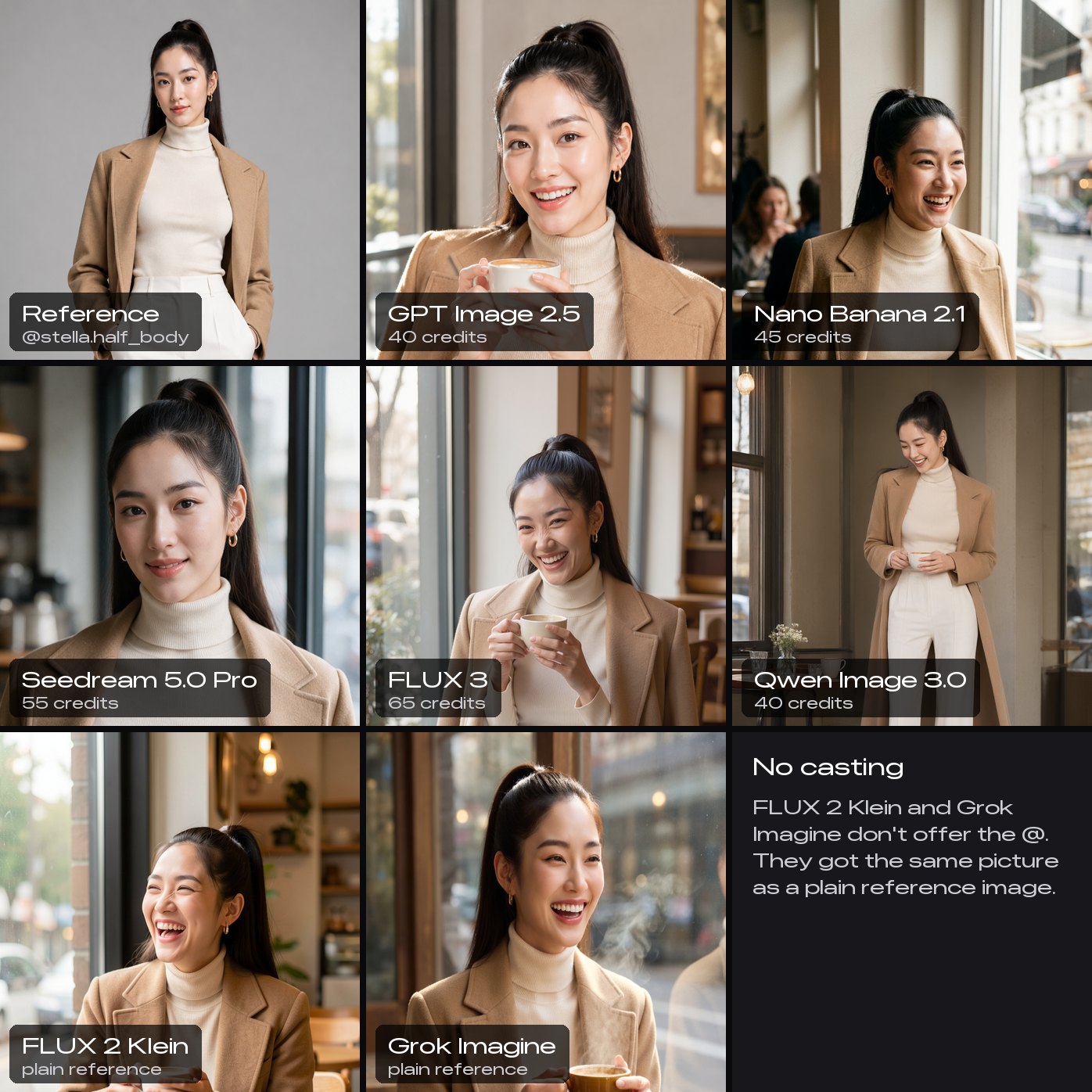
Next we kept the scene fixed and changed the model. Every model got the same picture of Stella, her half-body shot, and the same prompt: she laughs at a café table by a window, holding a cup with both hands, in a close-up from the chest up. On the five models that take casting we wrote @stella.half_body. FLUX 2 Klein and Grok Imagine don't offer casting, so they got the same picture as a plain reference image.
| Model | Kept her face | 1K price |
|---|---|---|
| GPT Image 2.5 | Yes, closest | 40 credits |
| Seedream 5.0 Pro | Yes, closest | 55 credits |
| Nano Banana 2.1 | Yes | 45 credits |
| FLUX 3 | Yes, laughing | 65 credits |
| Qwen Image 3.0 | Yes, smaller | 40 credits |
| FLUX 2 Klein | No | 10 credits |
| Grok Imagine | No | 35 credits |
GPT Image 2.5 and Seedream 5.0 Pro gave the nearest likeness. Seedream kept her face so faithfully that it kept her reference expression too, a closed-mouth smile instead of the laugh we asked for. FLUX 3 held her through a wide laugh, which is a harder test, because a big expression changes the shape of a face. Qwen Image 3.0 kept her too, but drew her full length instead of the close-up we asked for, so her face is smaller in the frame.
The last two pictures are the reason the @ only appears on some models. FLUX 2 Klein and Grok Imagine took the same picture and returned a woman in the same coat and the same ponytail, with a different face. We test every model that takes reference pictures before casting is offered on it. The ones that turned a reference into a lookalike, FLUX 2 Dev and Klein, Grok Imagine and P-Image Edit, don't show the @ at all, so you can't pick one by accident.
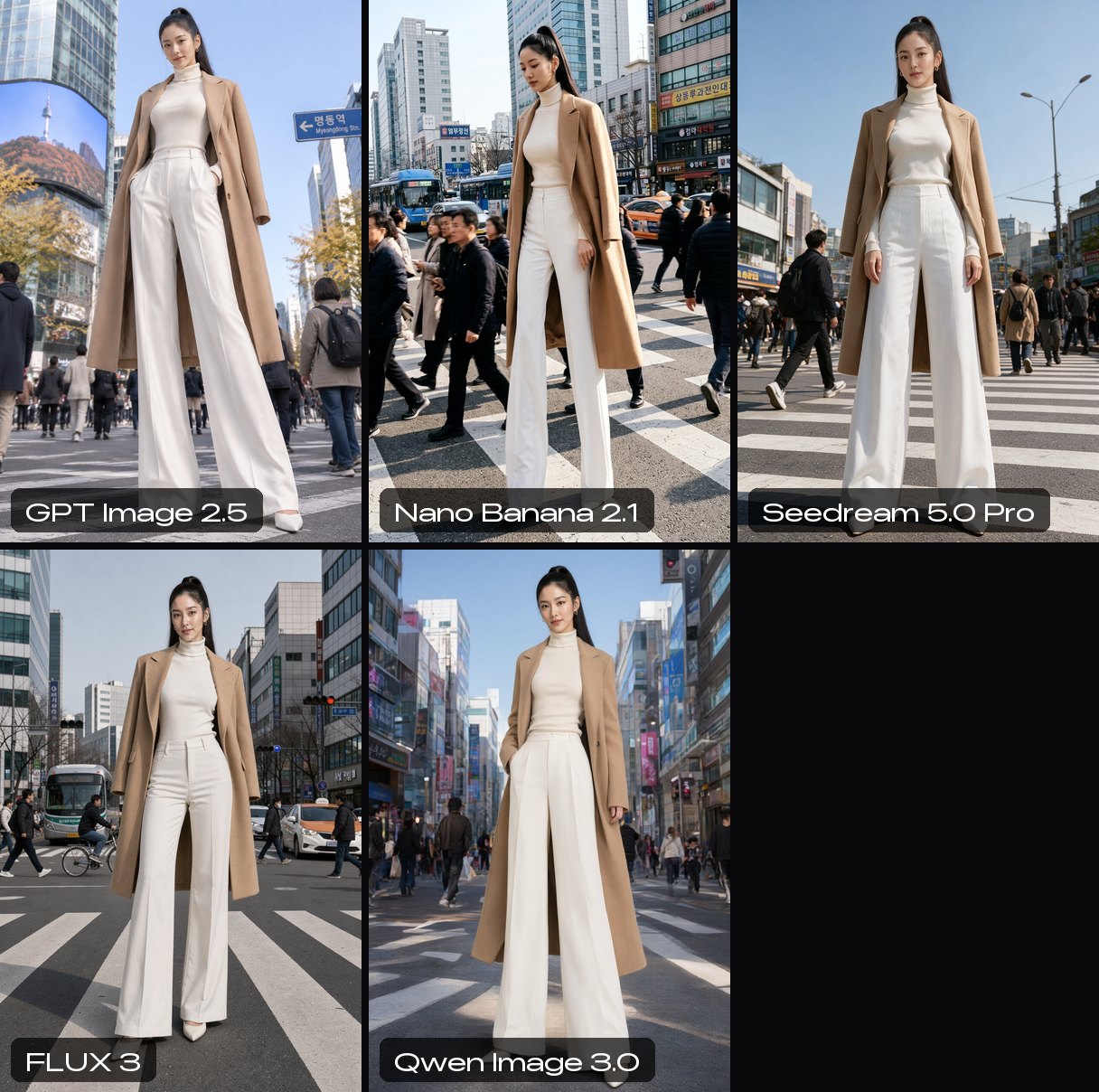
Shot full length on her own, all five cast models kept Stella's whole look: the ponytail, the coat over her shoulders, the endless white trousers and her surreal height, which her record puts at about two and a half metres.
Test 3: the details that make a character
A face is only part of a character. Barry, our ambassador, is recognisable from across a room: a yellow travel neck pillow he never takes off, giant gold aviators, a thin mustache and a plastic gold chain with a cardboard dollar sign. We cast him on the same five models with one prompt: @barry films a selfie in a luxury car showroom, holding up a car key he clearly cannot afford.
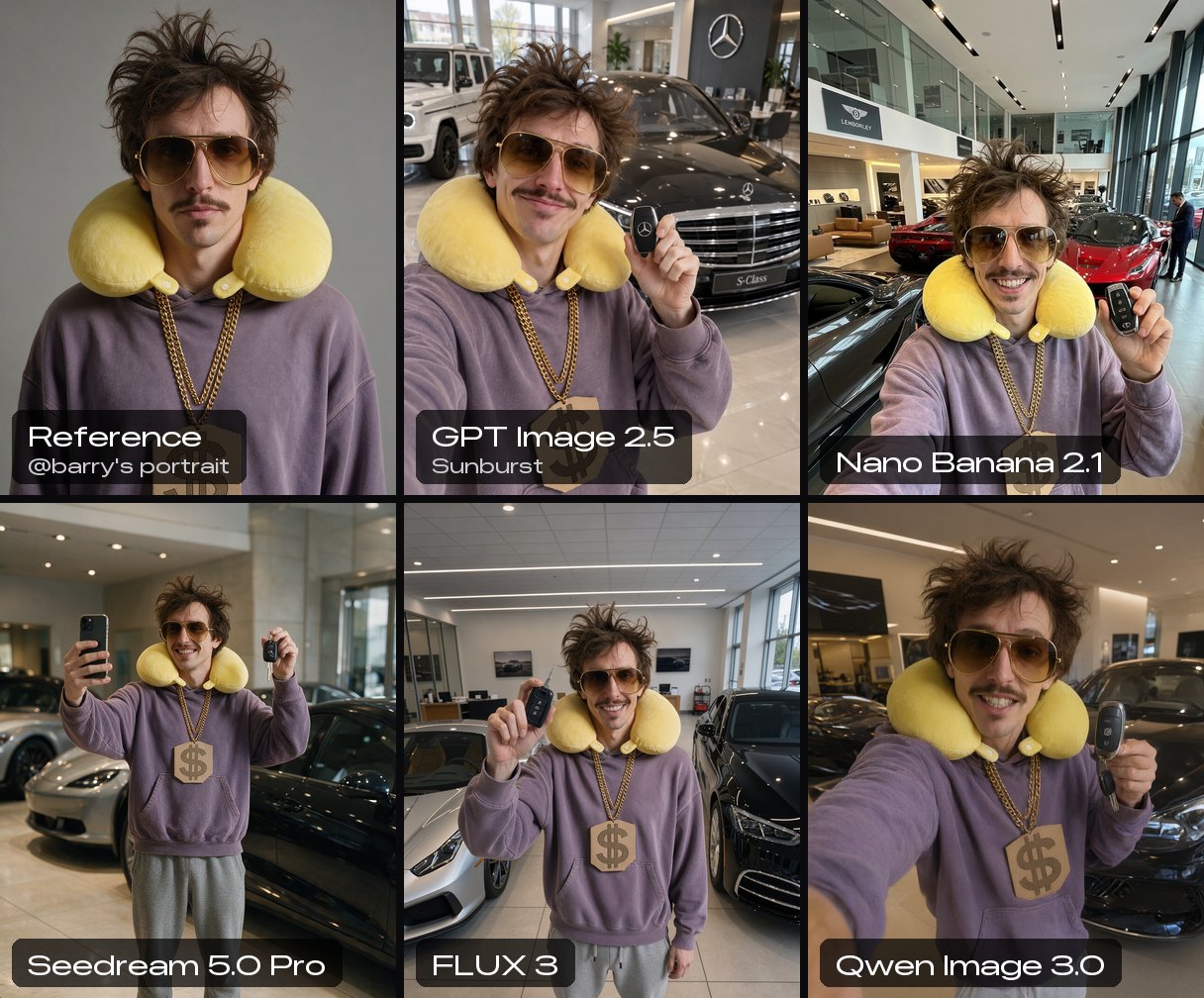
Every model kept every detail: the pillow, the aviators, the mustache, the chain and the faded purple hoodie. The only differences were in direction. Seedream 5.0 Pro and FLUX 3 photographed him from across the room instead of as a selfie, which is a matter of following the prompt, not of keeping the character.
His character record carries one rule worth copying: no other colour words near his pillow. A prompt that once gave him a red cap turned the pillow red as well. Colours leak between nearby words, so keep them away from a character's signature colours.
Test 4: two characters in one picture
Two characters in one frame are a classic failure: a model blends them, so one borrows the other's hair or jewellery. We cast both in one prompt: @barry asks @stella for a selfie outside a fashion show, and she bends far down to fit into his phone's frame.
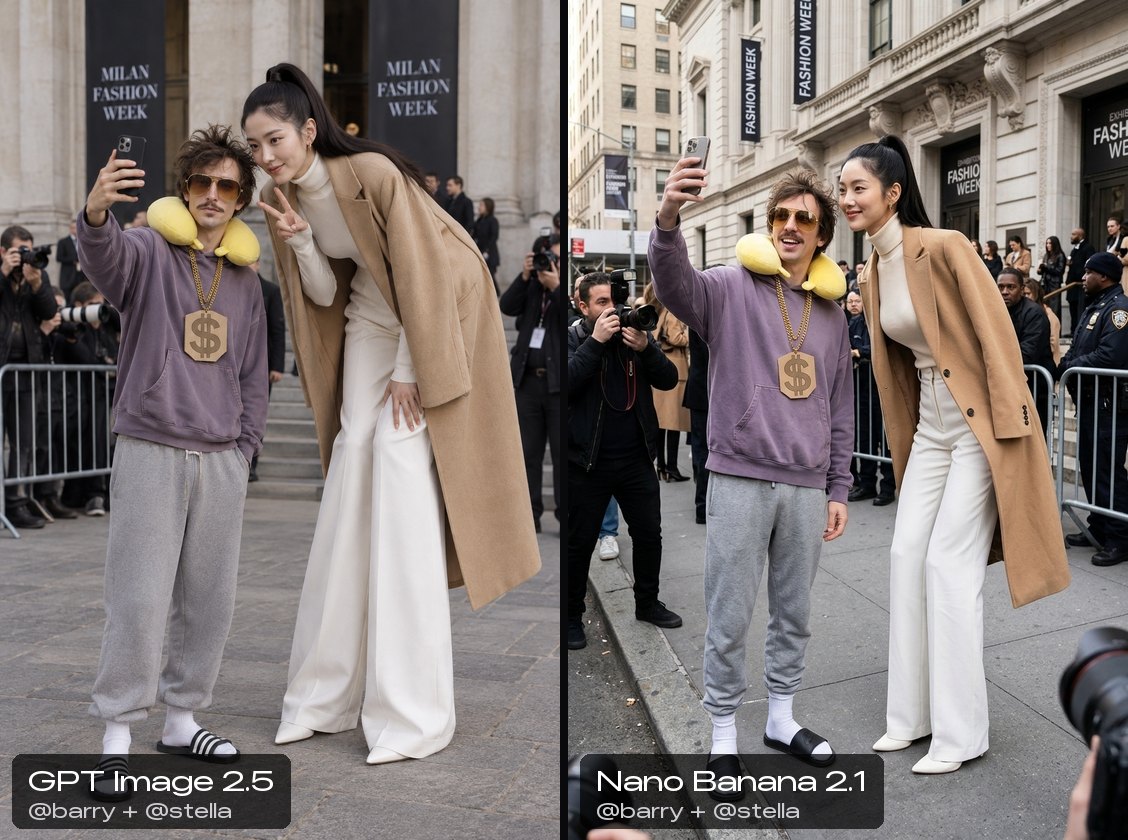
Both models kept the two apart: Barry's pillow and chain stayed on Barry, and Stella's hoops and ponytail stayed on Stella. The difference was scale. GPT Image 2.5 kept her towering over him and bending down, as written. Nano Banana 2.1 made her his height, although the same model kept her towering proportions when she was alone in the frame.
In our test, unusual proportions were the first thing to give when the model had two characters to keep track of. If a character's size or shape is part of the joke, say it again in the prompt when they share the frame. Each character's picture counts as a reference image, so two characters cost 45 credits on GPT Image 2.5 against 40 for one.
Test 5: the same character in video
Then we moved to video, where a face has to survive motion, turns and changing light. We gave three video models one prompt, 5 seconds at 720p in 9:16, one take each: @stella walks toward the camera along a sunny Paris street lined with cafés, stops, looks back over her shoulder and smiles.
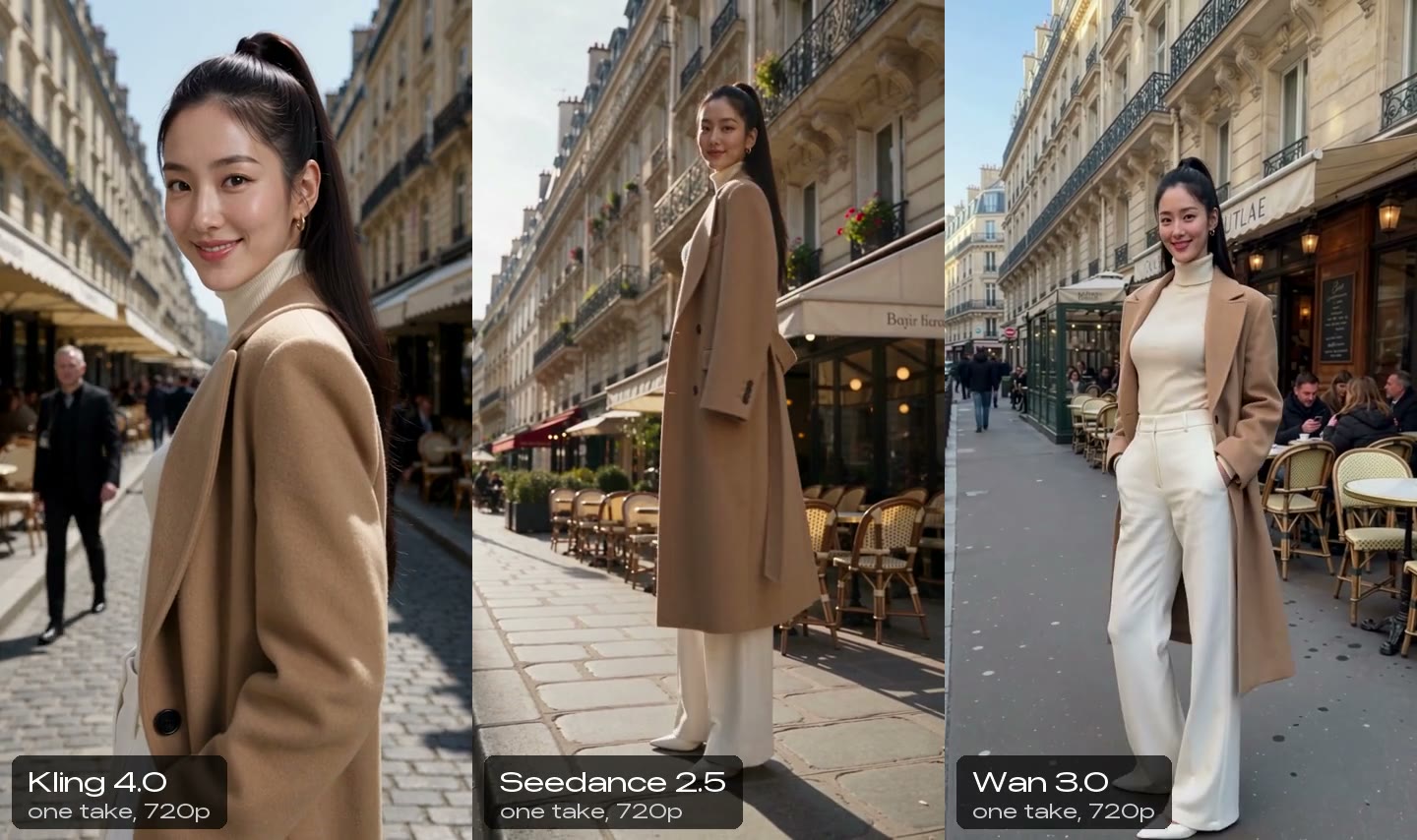
All three kept her outfit, her ponytail, her hoops and her height in every frame, walking and turning.
- Kling 4.0 pushed in to a close-up as she turned. Her face there is the closest to her reference of the three. 1,035 credits; about 2.5 minutes.
- Seedance 2.5 did the look over the shoulder exactly as written, full length the whole way, and kept her face through the turn. 1,650 credits; about 3 minutes.
- Wan 3.0 turned her to the side and back to the camera. It kept her look, but at full length her face came out softer and rounder than her reference. 600 credits; about 3 minutes.
The pattern matches the stills: the smaller the face is in the frame, the fewer pixels the model has to draw it with, and the more it drifts. For a recurring character in video, favour medium shots for the moments that need her face, and save the wide shots for walking.
Two things work differently in video. On BudgetPixel a cast goes in as reference pictures, so it can't be combined with a start or end frame. And a cast carries the face, not the voice: each clip made with sound invents a new voice. For a voice that stays the same, make the speech once with one text-to-speech voice and lip-sync the clip to it, or give your own character a voice and make it talk, as in how to create an AI influencer.
How to keep a character consistent on BudgetPixel
- Pick a character. Choose one of the 55 AI influencers, free to cast on every plan, or make your own in Character Studio from your photos or from a description. A good character has a full picture set: a portrait, full body, three-quarter and side views, the back and a few expressions, in the same hair, outfit and light. Our influencers carry a written look, signature details and consistency rules as well.
- Type its handle in the prompt. Write
@stella(with the character's own handle) on any model that shows the @ Characters button: 21 image models, including GPT Image 2.5, Nano Banana 2.1, Seedream 5.0, FLUX 3 and Qwen Image 3.0, and 11 video models, including Kling 4.0, Seedance 2.5, Wan 3.0 and MiniMax H3. The handle becomes "Stella, the person in image 1" with her look attached, so you don't need to describe her. - Choose the picture for the shot. A plain
@stellasends her portrait. For a full-length shot,@stella.full_bodysends that picture instead; every tagged picture on a character's page has its own mention. - Add the rest of the cast. Up to four characters fit in one generation. Each one's picture counts as a reference image, which a few models price per picture.
- Check what your plan includes. Casting works on every plan, and you pay only for the generation. The Free plan's models include Seedream 5.0 Pro, FLUX 3 and Qwen Image 3.0 for pictures, and Seedance 2.5 and Wan 3.0 for video. GPT Image, Nano Banana and Kling need a paid plan. The Free plan comes with 300 credits a month, plus a few for each day you check in.
The same @handle works through the developer API and MCP, so an agent like Claude can cast the same characters on a paid plan: see AI influencers in Claude Cowork. To put a character into a video that already exists, such as a dance trend, Recast swaps it in and keeps the moves.
Our influencers come with two rules: when you post, credit the character, for example "Stella, a BudgetPixel AI influencer", with a link to her page; and never show them nude or in sexual content.
What makes a good reference picture
A cast sends one picture per mention, so that picture does most of the work. If you build your own character, these are the pictures that hold up:
- A clear, front-facing portrait as the default. Even light, the face filling a good part of the frame, eyes visible. Sunglasses, a hat brim or hair across the face hide exactly what the model needs, unless they are part of the character, like Barry's aviators.
- A calm expression. The reference's expression can carry into new pictures, as Seedream showed by keeping Stella's soft smile when we asked for a laugh, so a neutral face or a soft smile is the safest default.
- The same hair, outfit and light across the set. Each view should look like the same shoot. If the full-body picture shows a different coat, the model has two looks to choose from.
- A full-body picture for full-length shots. A portrait says nothing about height, build or shoes, so mention the full-body picture whenever the shot shows them.
- Enough resolution. Our influencers' portraits and full-body pictures are 4K. A small or blurry picture gives the model less to hold on to.
Tips that made the difference
- Let the cast describe the character. The handle already sends the picture and the look, so spend the prompt on the scene, the action and the camera.
- Ask for the framing you want, plainly. A striking detail in a description, like Stella's legs, can pull the model into a full-length shot you didn't ask for.
- Match the picture to the shot. A portrait for close-ups, the full-body picture for full-length shots.
- Keep colour words away from signature colours. A red cap near Barry's yellow pillow turned the pillow red.
- Say unusual proportions again when characters share a frame. Alone, all five models kept Stella's height; next to Barry, one of two didn't.
- Keep the face big enough in video. Medium shots keep the likeness; small faces in wide shots go soft.
- Pick the model for the job. GPT Image 2.5 and Seedream 5.0 Pro for the closest likeness in stills, FLUX 3 for big expressions, Kling 4.0 for faces in motion.
Other ways to keep a character consistent
- Train a LoRA. A LoRA is a small add-on trained on 15 to 30 pictures of one character. It can lock a face and a style into one image model, but it takes time to train, works only with the model family it was trained for, and doesn't carry over to video.
- Train an identity from selfies. Some apps, such as Higgsfield's Soul ID, train a face from 20 or more photos of one person, which suits putting yourself into pictures, with the person's consent. It works inside that app's own models.
- Use one tool's reference feature. Midjourney's Omni Reference (
--oref) carries a subject from one picture into new Midjourney images, with a weight that sets how strictly.
Casting from reference pictures needs no training and no photo shoot, and the same character works across image and video models from different makers. That is how our influencers are built.
Ready to try it? Open the AI influencers, pick a face, and write its handle into your next prompt.
Questions people ask
How do I keep an AI character consistent across images?
Give the model a picture of the character, not only a description. Words keep the clothes and hair; a reference picture keeps the face. On BudgetPixel, typing the character's @handle in a prompt sends its picture and written look together.
Why does my AI character's face keep changing?
Every picture starts from scratch, and a description fits thousands of faces. In our test the same written description gave four different women in four scenes, all in the same coat.
Which AI model is best for consistent characters?
In our October 2026 test, GPT Image 2.5 and Seedream 5.0 Pro stayed closest to the reference face, with Nano Banana 2.1 and FLUX 3 close behind. For video, Kling 4.0 held the face best in a close-up.
Do I need to train a LoRA to get a consistent character?
No. Current image and video models keep a face from reference pictures alone, with no training. A LoRA can still help when you need one image model to nail a very specific style.
Can I keep two characters consistent in the same image?
Yes. BudgetPixel takes up to four characters per picture. In our test both models kept Barry and Stella apart, but one of them shrank Stella's unusual height, so restate unusual proportions in the prompt.
Can AI keep a character consistent in video?
Yes. Kling 4.0, Seedance 2.5 and Wan 3.0 kept our character's face, hair and outfit through a walk and a look over the shoulder. Faces hold best in medium shots; in wide shots they get small and soft.
Are the BudgetPixel AI influencers free to use?
Yes, they are free to cast on every plan on the website: you pay only the model's usual price for each picture or clip. The developer API and MCP need a paid plan. When you post, credit the character and link to its page.
Try it yourself
Type @ and a name in any prompt. Casting is free; you pay the model's usual price.