Halloween countdown calendar
Free template · US Letter, landscape · 3300×2550
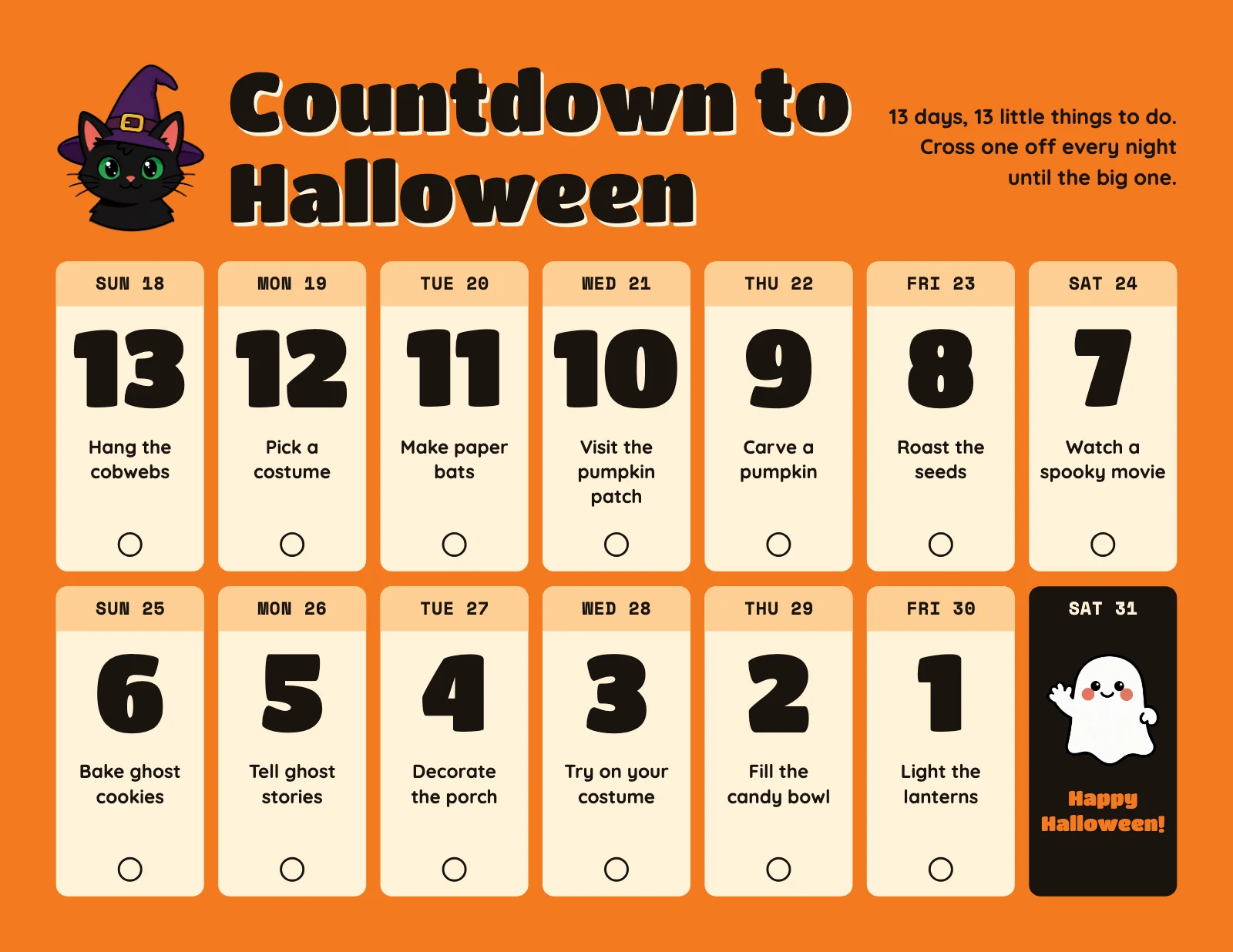
A countdown calendar for the 13 days before Halloween 2026, October 18 to 31, with one small thing to do each day. Retype the activities to suit your family. US Letter landscape, 3300×2550.
Free. Sign in or create a free account to open it in Design Studio, on a computer. Star it to find it again later.
What you can change
- Cat · photo: a cut-out to stand beside the title
- Title · text
- Explainer · text
- Dates row 1 · text
- Dates row 2 · text
- Final date · text
- Days left 13 · text
- Days left 12 · text
- Days left 11 · text
- Days left 10 · text
- Days left 9 · text
- Days left 8 · text
- Days left 7 · text
- Days left 6 · text
- Days left 5 · text
- Days left 4 · text
- Days left 3 · text
- Days left 2 · text
- Days left 1 · text
- To do 13 · text
- To do 12 · text
- To do 11 · text
- To do 10 · text
- To do 9 · text
- To do 8 · text
- To do 7 · text
- To do 6 · text
- To do 5 · text
- To do 4 · text
- To do 3 · text
- To do 2 · text
- To do 1 · text
- Ghost · photo: a cut-out for the Halloween box
- Final words · text
- Plus every colour, shape and font: all layers stay editable.
Details
- Format
- US Letter, landscape, a US Letter page turned sideways, to print at 300 dpi or share online
- Size
- 3300×2550 px
- Fonts
- Titan One, Quicksand, Space Mono (free, loaded for you)
- Category
- Business
- For
- Documents & planners
- Occasion
- Halloween
- Style
- Bold · Playful · Illustrated
See all: Halloween templates · Planner and calendar templates · Document templates · Bold and colorful templates · Cute and playful templates · Illustrated templates
How to use this template
- Choose "Use this template". It opens in Design Studio as your own copy.
- Click any text to select it, then click again to type.
- Click a photo, then Replace to use your own picture.
- Download as PNG or JPG, or ask the AI designer to change colours, wording or style.
Free on every plan. You can use, edit and publish what you make from a template, for personal or commercial work. The templates themselves may not be resold or shared as templates.